


Participant
April 9, 2020
Answered

Progress being deleted when I "Save as"

  • April 9, 2020
  • 1 reply
  • 506 views

When I work on an animation project I make sure to save and then Save as and create multiple iterations of my project as I go along. I do this in the case my file corrupts and then I don't lose the entire project, as I have an older save to return to.


However, I keep getting a glitch where I will save and then save as and then quit the program. And then when I re-open the newest file all of my work since the last save has been lost. It's almost like it reverts back to a previous save rather than saving my current work. Similar behaviour to if you were to select the do not save button when you quit after doing a bunch of work on the project.


To clarify, in the below screenshot, file "Duke_MV_19" will be the exact same as file "Duke_MV_18" despite it being saved one minute after the recovery file. The recovery file has all of my work intact luckily. 
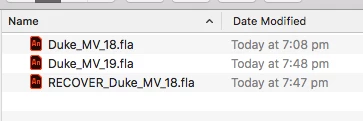
 

This glitch has happened multiple times. Is there any fix? Am I doing something wrong?

    This topic has been closed for replies.
    Correct answer n. tilcheff

    Hi mate,


    It's great that you have the habit to incrementally save versions of your file as you progress!


    I won't speculate whether this loss of data is a regular occurrence with the newer versions of Animate or not, only will mention that there have been multiple announcements in recent years that saving has been 'optimized' do work faster and there were hints that some caching and delayed writing is happening. 


    During the development of our tools we have identified various situations where due to 'optimizations' certain changes made with JSFL are not saved.

    One way to make sure changes get saved is to open the Document Settings dialog from the Modify menu > Document... and just hit OK. This will generate a Modify FLA Document history entry and force Animate to read and save all changes after that.


    Another workaround might be to save your file as uncompressed XFL and then from that to FLA.

    When you do this it will also re-read all the data and shrink if some assets have been deleted. 

    Back in the day Flash used to have an option called Save and Compact, which did that.


    Hope that some of these will work for you.


    I can't confirm the problem, because even though I do a lot of testing in Animate 2020, I don't use it for real work as I find it unreliable and unpleasant to use.


    1 reply

    n. tilcheff
    n. tilcheffCorrect answer
    Legend
    April 9, 2020

    Hi mate,


    It's great that you have the habit to incrementally save versions of your file as you progress!


    I won't speculate whether this loss of data is a regular occurrence with the newer versions of Animate or not, only will mention that there have been multiple announcements in recent years that saving has been 'optimized' do work faster and there were hints that some caching and delayed writing is happening. 


    During the development of our tools we have identified various situations where due to 'optimizations' certain changes made with JSFL are not saved.

    One way to make sure changes get saved is to open the Document Settings dialog from the Modify menu > Document... and just hit OK. This will generate a Modify FLA Document history entry and force Animate to read and save all changes after that.


    Another workaround might be to save your file as uncompressed XFL and then from that to FLA.

    When you do this it will also re-read all the data and shrink if some assets have been deleted. 

    Back in the day Flash used to have an option called Save and Compact, which did that.


    Hope that some of these will work for you.


    I can't confirm the problem, because even though I do a lot of testing in Animate 2020, I don't use it for real work as I find it unreliable and unpleasant to use.


    Nick - Character Designer and Animator, Flash user since 1998 | Member of the Flanimate Power Tools team - extensions for character animation
    Participant
    April 9, 2020

    Thank you so much. Great advice!

    Saving as an XFL and then a FLA has greatly reduced the file size. 


    If you do not use Animate 2020, what would you reccommend using?

    n. tilcheff
    Legend
    April 9, 2020

    Well done, mate!


    My favourite version of Flash is Flash Pro CS6. It gives me the best combination of features, performance and stability.

    Powered by Flanimate Power Tools I get great results.


    Here are two examples:

    https://youtu.be/hcy9lAlDbbU

    https://youtu.be/0b29vl5MMFU


    Good luck!


    Nick - Character Designer and Animator, Flash user since 1998 | Member of the Flanimate Power Tools team - extensions for character animation