
Properties panels interface doesn't resize properly
Hello all!
I've been using Adobe Animate for quite a few years now and I remember having this same issue when the 2020 version was first released.
Now this may be just a matter of changing some settings I'm not aware of in this version, but the properties panel interface does not resize when I shrink the panel, causing the full range of options to not be accessible. When open at full size so that the sliders and options are fully visible, it's a little too large for comfort. I don't know if this was intended or if it is a bug, but I think it'd be nice if the sliders could change size with the panel, like what already happens with the swatches panel. If there's a setting for that already, I'd also like to know! I already have the UI look set as "Compact" and the preferences set to "Expert user".
Apologies if I'm not making the issue too clear, English isn't the language I use for Animate and I'm not sure I'm using the correct technical terms here haha. Here are pictures to show you what I mean.
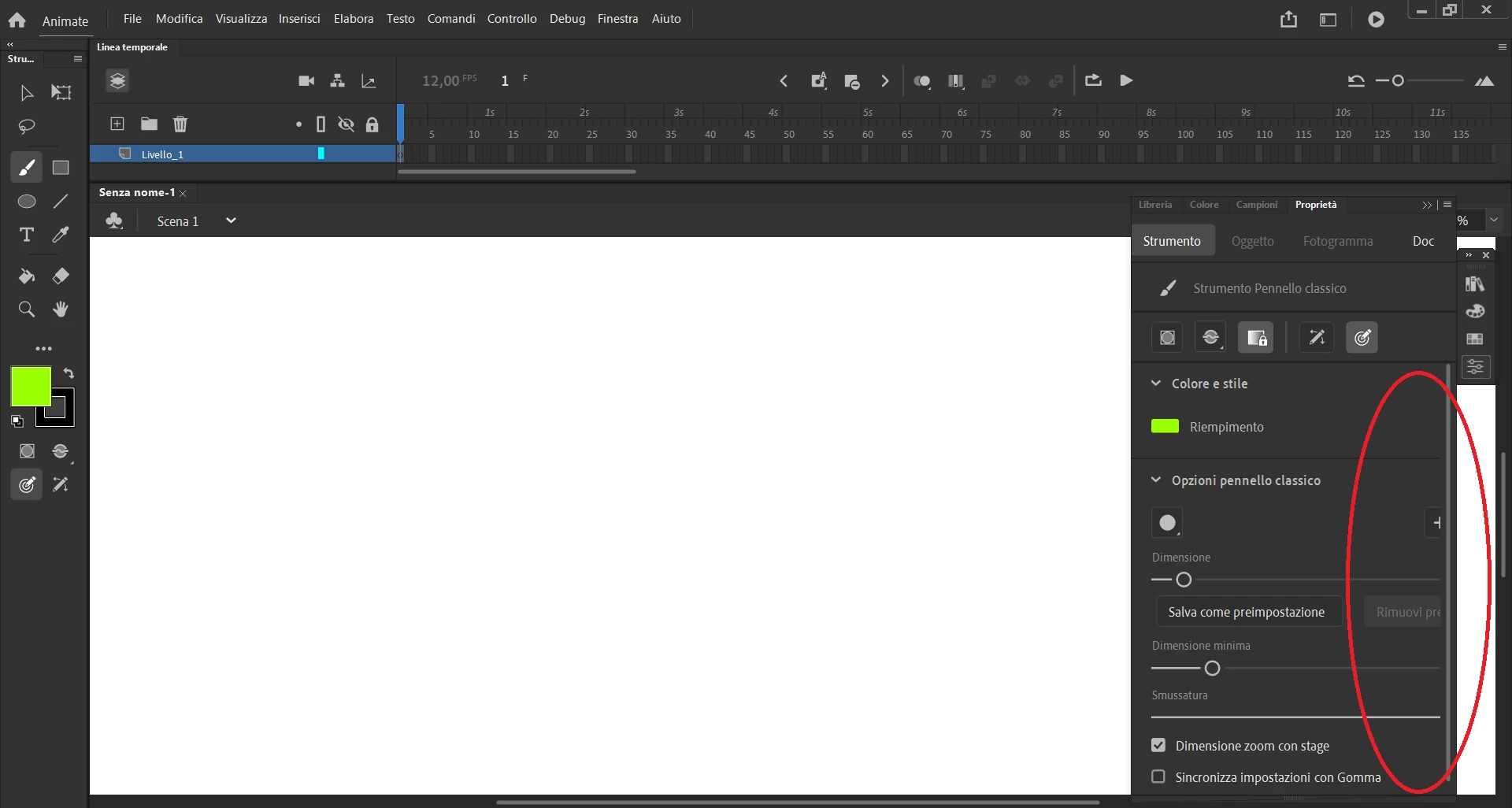
I'm using Adobe Animate 21.0 on Windows 10.
Thanks in advance for your help!


 AdChoices