
Known Participant
October 21, 2022
Answered

Published video very fuzzy

  • October 21, 2022
  • 3 replies
  • 1742 views

I used the wrong publish settings for my movie. Came here, got the right answer, redid and it worked beautifully. Uploaded it to YouTube.


Then I started playing around with adding an End Card but never finished it. (Don't know if that has anything to do with the current problem or not.)


Today, needed to launch the video. It was the original one with the fuzzy look (800x600).


Redid it quickly at 1920x1080 - looked fine again. Put it up on YouTube. Once again, it looks lousy. Fuzzy - like the 800x600 one.


Help? Should I delete the others from my YouTube channel and ONLY have this one? Are they somehow messing with each other? If not, what in the world is wrong?


This was supposed to launch 30 minutes ago so I'm in a panic. Here's the YouTube URL - not sure that will help, though. The mp4 looks FINE.
 

https://youtu.be/yX7fv2A_EKo

    This topic has been closed for replies.
    Correct answer kglad

    The dog and the other stuff, in the beginning, is all vector. I'm not worried about those items. I can see that they're not as sharp as I think they should be - and I don't know why that is - but at the moment. Those things are the least of my problems.


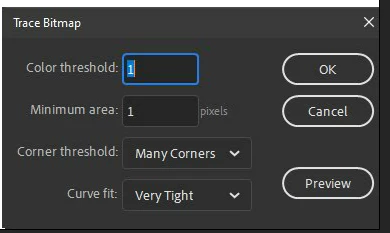
    I've been playing around with the bitmaps today, and I haven't been able to get them to work. Those are screenshots from our app. And the whole point of the video is to get people to subscribe to our app - so those screenshots are important. They need to look realistic. When I try to do the trace bitmap thing on those bitmaps, they end up looking terrible. The writing is just scribbles - not legible at all. The opposite of what I need. I may just not be using the correct settings for it but I haven't found any that are even close yet. I remember using trace bitmap when I first learned Flash way back then. And it seemed like you could get pretty realistic bitmaps. But I haven't been able to figure out how to do that. I keep thinking I must be doing something wrong but I'm not sure what. What resolution should the bitmaps be? Could that be part of it? I don't remember now what resolution I used for my screenshots but I can certainly change it if needed.


    use these settings


    to see:


    https://www.kglad.com/Files/forums/trace/trace_test2.html


    3 replies

    JoãoCésar17023019
    Community Expert
    Community Expert
    October 21, 2022

    Hi.


    It seems to me that some elements are crispy, but the dog's background and the brushes on the front, for example, are fuzzy.

    kglad
    Community Expert
    Community Expert
    October 21, 2022

    everything is low resolution. check the text.

    JoãoCésar17023019
    Community Expert
    Community Expert
    October 21, 2022

    The text in this one is much more defined then the dog's background and the brushes, for example.


    Known Participant
    October 21, 2022

    I just removed ALL previous versions on YouTube and put up a brand new video. Didn't help. Still looks awful. Any ideas? 

    kglad
    Community Expert
    Community Expert
    October 21, 2022

    again, clear your cache.

    Known Participant
    October 21, 2022

    It's still fuzzy in Chrome - fine in FF. Does it look ok to you? You have to get past the opening - that's fine in both. Start a bit in where there's an easel with a form on it - that's what's bad. I'm going to reboot my whole system.


    https://youtu.be/YxTTc1IFnsA

    kglad
    Community Expert
    Community Expert
    October 21, 2022

    clear your browser's cache and recheck your updated video.

    Known Participant
    October 21, 2022

    Brilliant suggestion which I hadn't considered. I tried it - didn't help. But I changed from Chrome to FF and it looks fine in FF. I think I need an update in Chrome. Let me try that.