Inspiring
December 4, 2020
Answered

Putting a CreateJS lib reference in my adobe animate template pointing to a disk location

  • December 4, 2020
  • 1 reply
  • 763 views

Hey guys,


I've been using adobe animate for a project I'm working on. It's a webpage that for example shows temperature values and other things from a facility. This webpage has to be able to run on a machine not connected to the web. For this I've had to download the CreateJS library and save it somewhere on my harddisk. Until now I've been changing the reference in my HTML file manually but I wish to do this with a template. 


I've tried adding the reference into my template but this will just add mine and keep the one adobe animate puts in. 
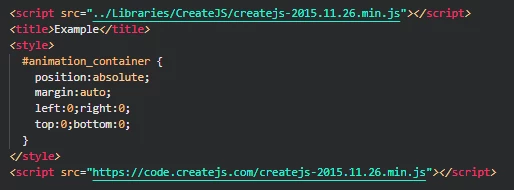
Is there a way to tell adobe animate to instead of using the web reference to input my reference in the second <script src=""> if so this would lower the chance of error on my part in forgetting to change this everytime I publish a page.


I hope someone has an answer!



This topic has been closed for replies.
Correct answer JoãoCésar17023019

Hi.


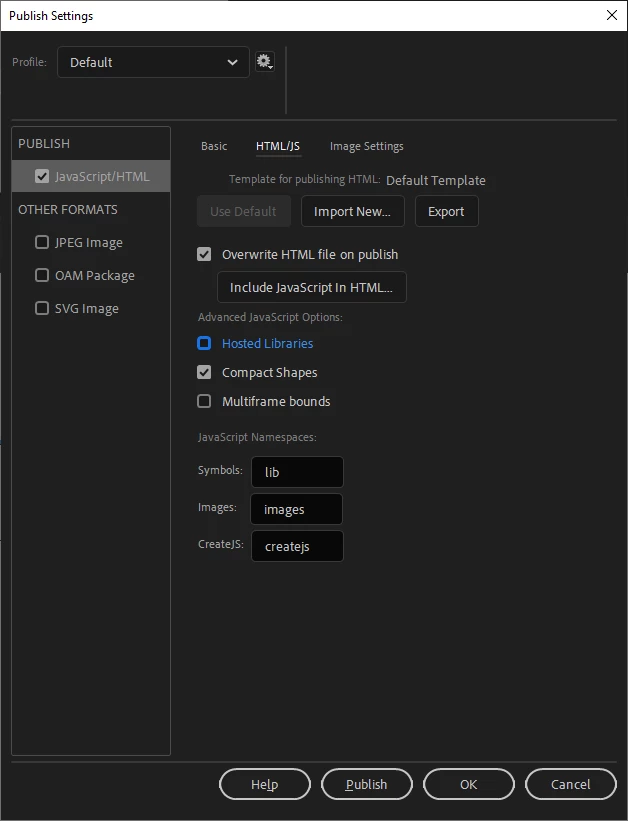
Go to File > Publish Settings... (Ctrl/Cmd + Shift + F12) > JavaScript/HTML > HTML/JS and uncheck Hosted Libraries.


Please let us know if this is the answer you're looking for.


Regards,

JC

1 reply

JoãoCésar17023019
Community Expert
JoãoCésar17023019Community ExpertCorrect answer
Community Expert
December 4, 2020

Hi.


Go to File > Publish Settings... (Ctrl/Cmd + Shift + F12) > JavaScript/HTML > HTML/JS and uncheck Hosted Libraries.


Please let us know if this is the answer you're looking for.


Regards,

JC

Inspiring
December 4, 2020

Thank you for the quick response, did not know the solution was right there in front of me the whole time.

JoãoCésar17023019
Community Expert
Community Expert
December 4, 2020

You're welcome!


And no problem. The important thing is that it helped you.


Regards,

JC