
Participant
December 29, 2018
Answered

Random Black Squares covering small animations.

  • December 29, 2018
  • 2 replies
  • 1586 views

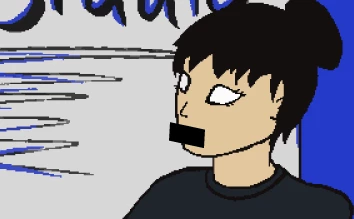
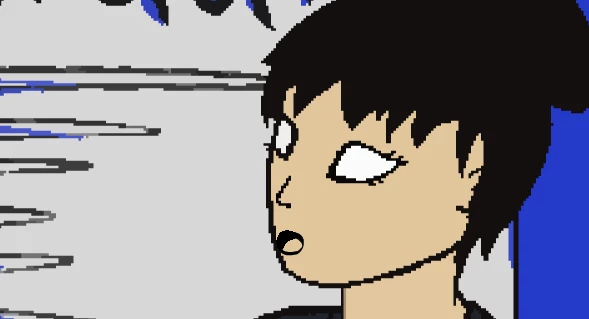
Whenever I export my animation with small objects such as small mouth movements, there are little black squares blocking parts of the screen for the duration of the frame. I'm sure this is a noob problem but it's very annoying and I can't find anything on it. It only happens when I'm zoomed out just the slightest bit. Whenever I zoom in on the object, the square things go away. The other thing is that when I zoom out to full screen in my scenes, some of the eyes disappear and it's super weird. Please tell me how I can fix this!

This is what the squares look like when I'm zoomed out a tiny bit
This is what it's supposed to look like when it's zoomed in
This topic has been closed for replies.
Correct answer _keyframer

Yes if you can, export/save them at a smaller size if possible to avoid having to scale them very small in Animate. This is a relatively new issue in Animate that might have something to do with advanced layers. I first saw it last summer with a student's project. He imported super hi res images and scaled them to like 5% and they would simply disappear.

2 replies

_keyframer
Community Expert
_keyframerCommunity ExpertCorrect answer
Community Expert
January 3, 2019

Yes if you can, export/save them at a smaller size if possible to avoid having to scale them very small in Animate. This is a relatively new issue in Animate that might have something to do with advanced layers. I first saw it last summer with a student's project. He imported super hi res images and scaled them to like 5% and they would simply disappear.

Animator and content creator for Animate CC
_keyframer
Community Expert
Community Expert
January 2, 2019

These are imported bitmaps correct? If so, it's a resolution issue. What size (width & height) are the original images and what scale percentage are they in Animate? I suspect they are high res and you scaled them way down in Animate...?

Animator and content creator for Animate CC
Participant
January 2, 2019

Yeah I have them as 2048 by 1536 and i scale them way down you’re right. So I guess I need to make them smaller originally and then import them to the stage?