Known Participant
January 8, 2019
Answered

random move clip

  • January 8, 2019
  • 1 reply
  • 385 views

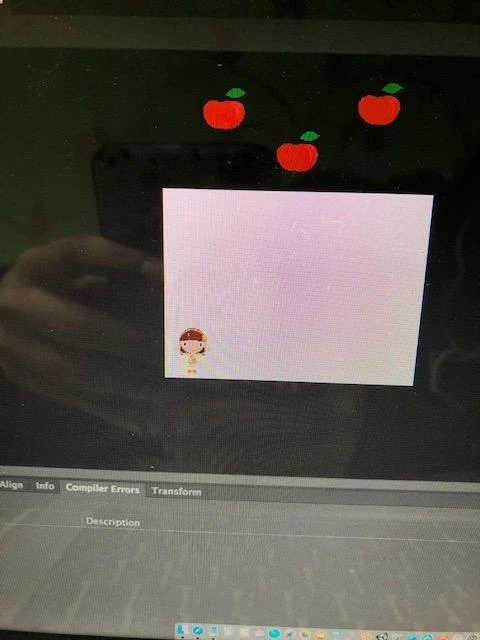
help plz .. i want  loop random  function make the apples  drop like rain from up to down ..and attach it with my code down plz help

plz be  attention that the apples  don't go outside the stage when it dropped

the instance name of apples move clips :apple1 apple2 apple3

my code :

stop();

  function mouseMoveHandler(e:Event):void 

    girlMc.x = mouseX; 


    if (girlMc.x < 0) 

          girlMc.x = 0; 

    else if (girlMc.x > stage.stageWidth - girlMc.width) 

          girlMc.x = stage.stageWidth - girlMc.width; 


stage.addEventListener(MouseEvent.MOUSE_MOVE, mouseMoveHandler);

    This topic is closed to new replies. Start a new post to keep the conversation going.
    Correct answer JoãoCésar17023019

    Hi.

    Here is a sample for you:

    AS3 code:

    // advanced layers off

    // tested in Animate CC 2019 (version 19.1, build 349)

    import flash.events.Event;

    import flash.utils.setInterval;

    import flash.utils.clearInterval;

    var AppleClasses:Array = [Apple, Apple1, Apple2]; // linkage names from the Library

    var totalApples:uint = 10; // total amount of apples that will be reused

    var yRange:uint = 1000; // maximum y position above the stage everytime an apple is created or respawn

    var minSpeedY:uint = 2;

    var maxSpeedY:uint = 7;

    var score:uint = 0;

    var appleCreationDelay:uint = 1; // each apple will be create with this delay in seconds in the beginning until the total amount of apples set above is reached

    var applesInterval:uint = 0;

    var apples:Array;

    function enterFrameHandler(e:Event):void

    {

         for (var i:int = apples.length - 1; i >= 0; i--)

         {

              var apple:* = apples;

              apple.y += apple.speedY;

              if (apple.hitTestObject(girlMc)) // here we check if some apple hits the girl

              {

                   score = Math.min(++score, uint.MAX_VALUE);

                   setScore();

                   randomValues(apple);

              }

              else if (apple.y > stage.stageHeight) // here we check if some apple reaches the bottom

              {

                   score = Math.max(--score, 0);

                   setScore();

                   randomValues(apple);

              }

         }

         girlMc.x = mouseX; // move the girl on x axis according to the mouse cursor

         // limit the girl within the stage

         if (girlMc.x < 0)

              girlMc.x = 0;

         else if (girlMc.x > stage.stageWidth - girlMc.width)

              girlMc.x = stage.stageWidth - girlMc.width;

    }

    function createApple():void

    {

         var apple:* = new AppleClasses[uint(Math.random() * AppleClasses.length)]();

         randomValues(apple);

         applesContainer.addChild(apple);

         apples.push(apple);

    }

    function setScore():void

    {

         scoreText.text = "SCORE: " + score;

    }

    function randomValues(target:*):void

    {

         target.x = uint(randomRange(0, stage.stageWidth - target.width));

         target.y = int(randomRange(-Math.random() * yRange, -target.height));

         target.speedY = uint(randomRange(minSpeedY, maxSpeedY));

    }

    function randomRange(min:Number, max:Number):Number

    {

         return min + Math.random() * (max - min);

    }

    function start():void

    {

         apples = [];

         createApple();

         applesInterval = setInterval(function()

         {

              if (apples.length <= totalApples)

                   createApple();

              else

                   clearInterval(applesInterval);

         }, appleCreationDelay * 1000);

         stage.addEventListener(Event.ENTER_FRAME, enterFrameHandler);

    }

    start();

    Please notice that if we are going to have to use an enterFrame event, then we don't need that mouseMove event anymore.

    FLA download:

    animate_cc_as3_follow_cursor_inside_of_the_stage.zip - Google Drive

    I hope this helps.

    Regards,

    JC

    1 reply

    JoãoCésar17023019
    Community Expert
    JoãoCésar17023019Community ExpertCorrect answer
    Community Expert
    January 8, 2019

    Hi.

    Here is a sample for you:

    AS3 code:

    // advanced layers off

    // tested in Animate CC 2019 (version 19.1, build 349)

    import flash.events.Event;

    import flash.utils.setInterval;

    import flash.utils.clearInterval;

    var AppleClasses:Array = [Apple, Apple1, Apple2]; // linkage names from the Library

    var totalApples:uint = 10; // total amount of apples that will be reused

    var yRange:uint = 1000; // maximum y position above the stage everytime an apple is created or respawn

    var minSpeedY:uint = 2;

    var maxSpeedY:uint = 7;

    var score:uint = 0;

    var appleCreationDelay:uint = 1; // each apple will be create with this delay in seconds in the beginning until the total amount of apples set above is reached

    var applesInterval:uint = 0;

    var apples:Array;

    function enterFrameHandler(e:Event):void

    {

         for (var i:int = apples.length - 1; i >= 0; i--)

         {

              var apple:* = apples;

              apple.y += apple.speedY;

              if (apple.hitTestObject(girlMc)) // here we check if some apple hits the girl

              {

                   score = Math.min(++score, uint.MAX_VALUE);

                   setScore();

                   randomValues(apple);

              }

              else if (apple.y > stage.stageHeight) // here we check if some apple reaches the bottom

              {

                   score = Math.max(--score, 0);

                   setScore();

                   randomValues(apple);

              }

         }

         girlMc.x = mouseX; // move the girl on x axis according to the mouse cursor

         // limit the girl within the stage

         if (girlMc.x < 0)

              girlMc.x = 0;

         else if (girlMc.x > stage.stageWidth - girlMc.width)

              girlMc.x = stage.stageWidth - girlMc.width;

    }

    function createApple():void

    {

         var apple:* = new AppleClasses[uint(Math.random() * AppleClasses.length)]();

         randomValues(apple);

         applesContainer.addChild(apple);

         apples.push(apple);

    }

    function setScore():void

    {

         scoreText.text = "SCORE: " + score;

    }

    function randomValues(target:*):void

    {

         target.x = uint(randomRange(0, stage.stageWidth - target.width));

         target.y = int(randomRange(-Math.random() * yRange, -target.height));

         target.speedY = uint(randomRange(minSpeedY, maxSpeedY));

    }

    function randomRange(min:Number, max:Number):Number

    {

         return min + Math.random() * (max - min);

    }

    function start():void

    {

         apples = [];

         createApple();

         applesInterval = setInterval(function()

         {

              if (apples.length <= totalApples)

                   createApple();

              else

                   clearInterval(applesInterval);

         }, appleCreationDelay * 1000);

         stage.addEventListener(Event.ENTER_FRAME, enterFrameHandler);

    }

    start();

    Please notice that if we are going to have to use an enterFrame event, then we don't need that mouseMove event anymore.

    FLA download:

    animate_cc_as3_follow_cursor_inside_of_the_stage.zip - Google Drive

    I hope this helps.

    Regards,

    JC