
Participant
March 28, 2019
Answered

RE: Javascript errors in HTML5 Canvas project

  • March 28, 2019
  • 2 replies
  • 5700 views

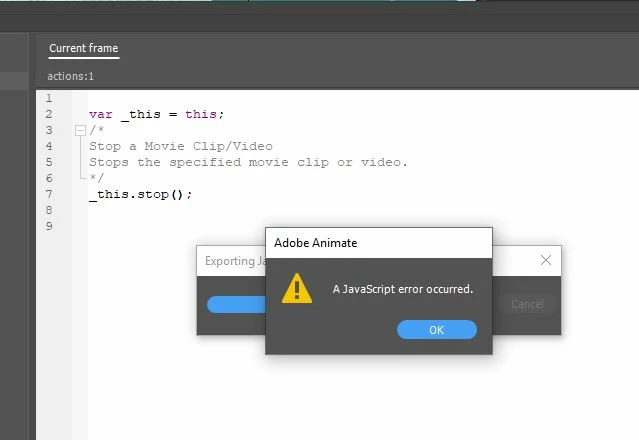
Can anyone help me? I have tried everything, I'm new to Animate. I'm taking it in school. I am getting unexpected errors in Javascript using the Actions Wizard in a HTML5 canvas, 800px x 600px and I'm toltally clueless with java, I will be taking it but haven't yet. My project involves moving text, photos, buttons, labels. Are there any known issues? and Yes I checked my naming conventions. But I am still learning it. Regards, Cheryl
This topic has been closed for replies.
Correct answer JoãoCésar17023019

Hi.

This is not an error from your script.

You're probably publishing your project with the default Export document as texture option on (File > Publish Settings... > JavaScript/HTML > Image Settings > Export document as texture).

And this option causes this error sometimes.

What you can do is to restart Animate CC and try again. And if the error persists and you don't want to keep restarting, uncheck that option by now.

Also, please report this bug here:

Adobe Animate CC Feature Request/Bug Report Form

Regards,

JC

2 replies

Participant
April 29, 2024

No solutions.... I've update, upgrade,...then,...uninstall animate, reinstall last version...error still there.. I have a simple symbol in my library who I cannot update, or use cause of that arror that I cannot fix.  😞  what does it take to have adobe support ?

kglad
Community Expert
Community Expert
April 29, 2024

@Andrea26785605icfa 


please do not post duplicate messages. and see your other post.

JoãoCésar17023019
Community Expert
JoãoCésar17023019Community ExpertCorrect answer
Community Expert
March 28, 2019

Hi.

This is not an error from your script.

You're probably publishing your project with the default Export document as texture option on (File > Publish Settings... > JavaScript/HTML > Image Settings > Export document as texture).

And this option causes this error sometimes.

What you can do is to restart Animate CC and try again. And if the error persists and you don't want to keep restarting, uncheck that option by now.

Also, please report this bug here:

Adobe Animate CC Feature Request/Bug Report Form

Regards,

JC

Participant
March 28, 2019

OMG, it worked is this a default setting? I spent all fricken night trying to solve this. I hate troubleshooting but a setting, that really ticks me off. Thank you so much for your help. I will proceed with my project. Are there any other known issues, this is the latest version on cloud of Animate.

JoãoCésar17023019
Community Expert
Community Expert
March 28, 2019

Yeah. It is turned on by default.

Even though it has some bugs now, it is a really useful feature because it really helps boosting performance.

Please consider testing your project in the final stage with and without this feature. You never know.

By the way, if you want to get errors that may be coming from your code, you have to look at the browser's console (usually the shortcut is F12).

Another feature that you may want to turn on and off is the advanced layers mode (Ctrl/Cmd + J). Not because it is buggy, but because it requires an extra coding effort to reference instances. So if you don't need advanced stuff like camera or layer parenting, you better turn this feature off.

Regards,

JC