Inspiring
March 8, 2022
Answered

Scale a movie clip with HTML5 JS code with no loss of resolution

  • March 8, 2022
  • 2 replies
  • 538 views

Hi Animate,

I have a game where you click on a button and that scales another movie clip on the stage.  I can get this to work with code, but the upscaled movie clip becomes pixelated (see JPG).  Is there any way to make the clip scale up and maintain its resolution?  It should be scalable as it is vector art.  Thanks.  Here's my code.

Zaffer

this.grow_btn.addEventListener("click", growSomeFlower.bind(this));

function growSomeFlower()
{
	currentClickedFlower.scaleX = currentClickedFlower.scaleX * 1.2;
	currentClickedFlower.scaleY = currentClickedFlower.scaleY * 1.2;
}

this.shrink_btn.addEventListener("click", shrinkSomeFlower.bind(this));

function shrinkSomeFlower()
{
	currentClickedFlower.scaleX = currentClickedFlower.scaleX * 0.8;
	currentClickedFlower.scaleY = currentClickedFlower.scaleY * 0.8;
}

 

    This topic has been closed for replies.
    Correct answer JoãoCésar17023019

    The symbol stored in the Library could already be resized to 2x, 3x or any other size and you could set a maximum size for the user. In fact, you should set a maximum size so that users won't have problems in older devices.


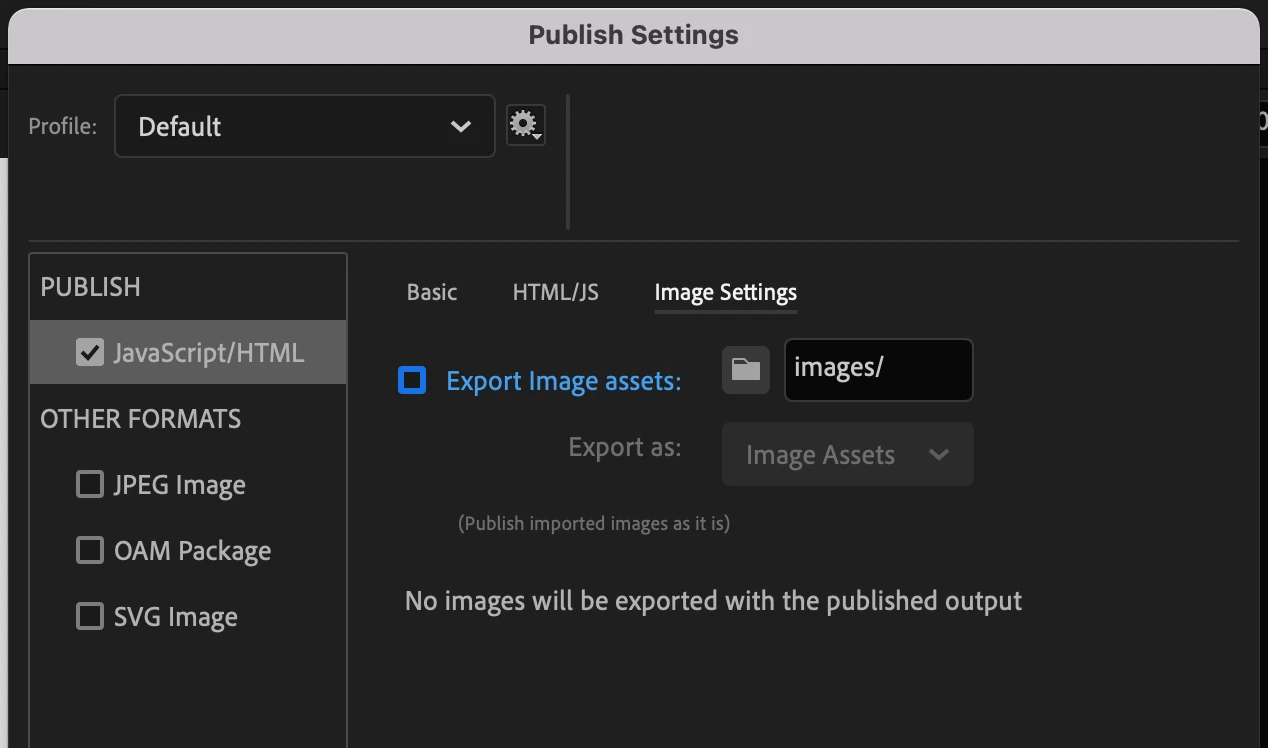
    But if you only want to use vector shapes, you can use these publish settings:


    Just remember that cache uses bitmaps even if your artwork is a vector.


    Regards,

    JC

    2 replies

    JoãoCésar17023019
    Community Expert
    Community Expert
    March 8, 2022

    As a bonus, your code can be reduced to this:

    this.grow_btn.addEventListener("click", growSomeFlower.bind(this));
    
    function growSomeFlower()
    {
    	currentClickedFlower.scale *= 1.2;
    }
    
    this.shrink_btn.addEventListener("click", shrinkSomeFlower.bind(this));
    
    function shrinkSomeFlower()
    {
    	currentClickedFlower.scale *= 0.8;
    }


    Regards,

    JC

    JoãoCésar17023019
    Community Expert
    Community Expert
    March 8, 2022

    Hi.


    There are at least two things that you may need to consider:


    1 - The default publish method of Animate converts all complex shapes to bitmaps. So if you want to double the size of an instance at runtime, for example, you should create it at the double of the size and then resize it to 50% in the IDE;


    2 - If you're applying color effects, you need to use cache and by default the cache scale is set to 1. You can change the cache scale by sending a fifth argument when using the cache method. Like this:

    this.yourInstance.cache(x, y, w, h, scale);


    Please let us know one of these considerations may be what you need.


    Regards,

    JC


    ZafferAuthor
    Inspiring
    March 8, 2022

    Hi Joao,

    Thanks for your suggestions.  Your first suggestion won't help because of the way my game works:  The user picks a flower from the garden which then appears over a vase.  There is a button in the console which will either enlarge or shrink the flower by increments, so there is no way for me to know what size the flower will be when the user is finished with it.  I'm not sure your second suggestion will help either as rescaling and coloring the flower are two independent actions that work from two different buttons on the console.  


    Is there a way to force Animate to publish images as vectors rather then bitmaps?  Thanks.

    Zaffer

    JoãoCésar17023019
    Community Expert
    JoãoCésar17023019Community ExpertCorrect answer
    Community Expert
    March 8, 2022

    The symbol stored in the Library could already be resized to 2x, 3x or any other size and you could set a maximum size for the user. In fact, you should set a maximum size so that users won't have problems in older devices.


    But if you only want to use vector shapes, you can use these publish settings:


    Just remember that cache uses bitmaps even if your artwork is a vector.


    Regards,

    JC