Participating Frequently
October 30, 2018
Answered

Scaling motion tween timeline preview

  • October 30, 2018
  • 1 reply
  • 578 views

Hi everybody,

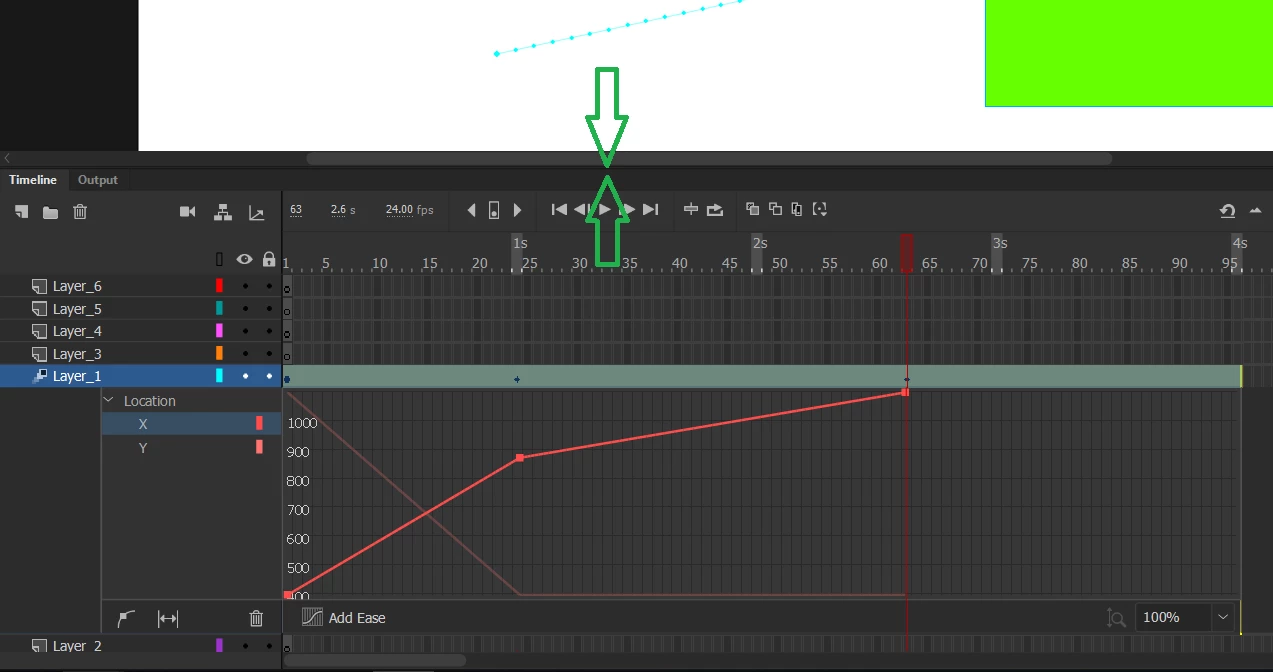
When using motion tweens (not 'classic') I am struggling massively with the small motion tween preview, the one that appears after double-clicking motion timeline animation.

It is being displayed very short when double-clicking the timeline when a large number of layers is present:

There is no way to fine-tune animation curves with such scale. I click the "Fit to view" button but it scales only horizontally.

I hovered a mouse pointer over edges hoping for a resize handlers to appear, but no success. Such an annoying quirk!
Any ideas how to make it taller?
This topic has been closed for replies.
Correct answer Mohanaraj

Sorry i meant to increase the Timeline panel height

Thanks!

Mohan

1 reply

Mohanaraj
Adobe Employee
Adobe Employee
October 31, 2018

Hi - Does increasing the height of the Timeline helps?

Thanks!

Shabz29Author
Participating Frequently
October 31, 2018

Hi Moraj, that would solve the problem but the thing is I am not able to do that.

If you're talking about timeline options in the preferences in the small hamburger menu in the corner, then contrary to the expected, 'Short' option make it slightly higher. 'Tiny', 'Normal' etc are not relevant - they just squash it more or less horizontally, much better to just click small 'Fit to view' option.

Mohanaraj
Adobe Employee
MohanarajCorrect answer
Adobe Employee
October 31, 2018

Sorry i meant to increase the Timeline panel height

Thanks!

Mohan