
Participant
March 2, 2023
Answered

Scaling when entering values in input box does not happen to scale point

  • March 2, 2023
  • 1 reply
  • 400 views

Dear Adobe Animate together folders,

When I scale using my mouse and drag from a side or corner it scales to the translation point that I have set. (Not sure this is the right word but that white dot)

However, when I change the height or width by entering a value in the input boxes it scales to the top left of a object.

Is this how it should work, or is this a bug?
    This topic has been closed for replies.
    Correct answer n. tilcheff

    It's called the Transformation Point.

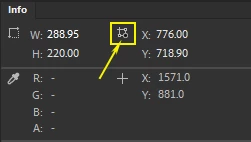
    In the Info panel, click here:

    Then transformations will occur the way you want them.


    1 reply

    n. tilcheff
    n. tilcheffCorrect answer
    Legend
    March 2, 2023

    It's called the Transformation Point.

    In the Info panel, click here:

    Then transformations will occur the way you want them.


    Nick - Character Designer and Animator, Flash user since 1998 | Member of the Flanimate Power Tools team - extensions for character animation
    Participant
    March 2, 2023

    Thank you so much!