Participant
February 25, 2017
Answered

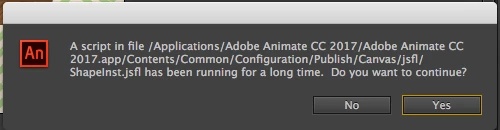
Script blocking 'publish' and 'test' in browser function for html5 animation

  • February 25, 2017
  • 1 reply
  • 322 views

URGENT!

Every time I try to either publish or test/view the animation in my browser Animate CC throws this message:

When I click on yes, it repeatedly asks me the same thing & crashes the application.

How can I turn off this script from timing out & stopping execution?

PLEASE HELP, this work is urgently needed.

This topic has been closed for replies.
Correct answer Colin Holgate

Hello,

I deleted a complex vector image I was using for a background (didn't realise it was a vector until I checked) and the animation is exporting to test & has been published successfully.

Thank you!!


Your background is a lot of lines and noise patterns, and that would be very hard to describe as vectors. You also have a key frame in that layer and the shelf layer, making it twice as much to publish.

I'll try a test out of interest to see what a one frame of just the background comes out as when it's Javascript... even that takes too long.

Anyway, the easy solution is to make it be a bitmap. You might as well include the shelf too. Doing that also took a bit of time, but once they were a bitmap the FLA publishes in about 1 second.

I see you replied by now too. Last thing I will try is to cut out a bit of the background to see if a small chunk publishes.

1 reply

Colin Holgate
Inspiring
February 25, 2017

Are you using a lot of bitmaps, and also spritesheets? If you are, try turning off spritesheets for now.

Participant
February 25, 2017

I'm using only vector images created/modified within Illustrator & imported through a CC library. Spritesheets haven't been implemented either.

Colin Holgate
Inspiring
February 25, 2017

How complex are the vectors? If you delete a lot of things, does it then succeed?

Illustrator vectors could translate to quite a large Javascript file.

Would you be able to post your FLA somewhere for me to try?