Known Participant
April 11, 2014
Answered

Scrolling Question?
  • April 11, 2014
  • 2 replies
  • 2468 views

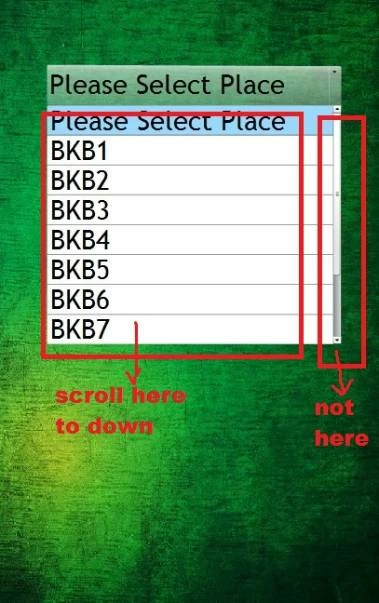
any solution for this...this is combobox compenent.

any solution?

This topic has been closed for replies.
Correct answer kglad

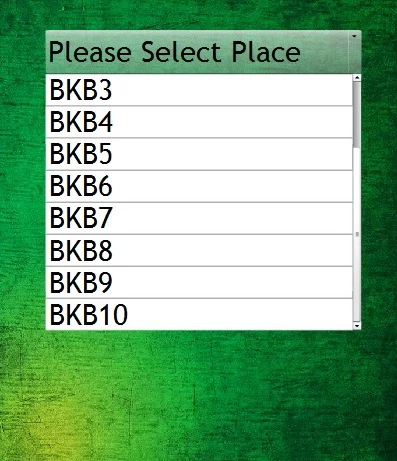
The result i get from this coding. The scroll Bar start from bottom and scrollpane cannot scrolling.

I was test on mobile phone.

coding i use:

var m:Number;

var b:Number;

combobox.addEventListener(MouseEvent.MOUSE_DOWN, startscrollF);

function startscrollF(event:MouseEvent):void {

paramF(combobox.mouseY,combobox.dropdown.verticalScrollPosition,combobox.height-10,combobox.dropdown.maxVerticalScrollPosition);

this.addEventListener(Event.ENTER_FRAME,scrollF);

this.addEventListener(MouseEvent.MOUSE_UP,stopscrollF);

}

function scrollF(e:Event):void{

combobox.dropdown.verticalScrollPosition=Math.round(Math.min(combobox.mouseY *m+b,combobox.dropdown.maxVerticalScrollPosition));

}

function stopscrollF(e:Event):void{

this.removeEventListener(Event.ENTER_FRAME,scrollF);

}

function paramF(x1:Number,y1:Number,x2:Number,y2:Number):void{

m=(y1-y2)/(x1-x2);

b=m*x1-y1;

}


use;

var m: Number;

var b: Number;

combo_box.addEventListener(MouseEvent.MOUSE_DOWN, startscrollF);

function startscrollF(event: MouseEvent): void {

    paramF(combo_box.mouseY, combo_box.dropdown.verticalScrollPosition, combo_box.dropdown.height - 10, combo_box.dropdown.maxVerticalScrollPosition);

    this.addEventListener(Event.ENTER_FRAME, scrollF);

    stage.addEventListener(MouseEvent.MOUSE_UP, stopscrollF);

}

function scrollF(e: Event): void {

    combo_box.dropdown.verticalScrollPosition = Math.round(Math.min(combo_box.dropdown.mouseY * m + b, combo_box.dropdown.maxVerticalScrollPosition));

}

function stopscrollF(e: Event): void {

    this.removeEventListener(Event.ENTER_FRAME, scrollF);

}

function paramF(x1: Number, y1: Number, x2: Number, y2: Number): void {

    m = (y1 - y2) / (x1 - x2);

    b = m * x1 - y1;

}

2 replies

Inspiring
April 12, 2014

Try this: When a user puts their finger on the list to start scrolling, have a variable track where they put their finger down, and have a timer update the CB's scroll amount by how much they have moved their finger from the original area where they put it down.

An example of a code to go along with this is:

var start_finger_position:Number

combo_box.addEventListener(MouseEvent.MOUSE_OVER, fl_hover);

function fl_hover(event:MouseEvent):void

{

    start_finger_position = mouseY

}

//insert timer listener and function here

//timer code:

{

combo_box.verticalScrollbar.scroll = combo_box.verticalScrollbar.scroll + (mouseY - start_finger_position)

}

(The timer updates the scroll, so have an interval of about 10-50)

garykangAuthor
Known Participant
April 12, 2014

sorry, i was try my best... i cant understand this coding work...need your help.. may i get the full coding?

var textFormat:TextFormat = new TextFormat();

textFormat.font = "Trebuchet MS";

textFormat.size = 50;

combobox.textField.setStyle("textFormat", textFormat);

combobox.rowCount = 8;

combobox.dropdown.rowHeight = 55;

combobox.dropdown.setRendererStyle("textFormat", textFormat);

combobox.addItem( {label: "BKB1"} );

combobox.addItem( {label: "BKB2"} );

combobox.addItem( {label: "BKB3"} );

combobox.addItem( {label: "BKB4"} );

combobox.addItem( {label: "BKB5"} );

combobox.addItem( {label: "BKB6"} );

combobox.addItem( {label: "BKB7"} );

combobox.addItem( {label: "BKB8"} );

combobox.addItem( {label: "BKB9"} );

combobox.addItem( {label: "BKB10"} );

combobox.addEventListener(Event.CHANGE, changeimage);

function changeimage(event:Event):void{


          if (combobox.selectedItem.label=="BKB1")gotoAndStop(2);

          if (combobox.selectedItem.label=="BKB2")gotoAndStop(3);

          if (combobox.selectedItem.label=="BKB3")gotoAndStop(4);

          if (combobox.selectedItem.label=="BKB4")gotoAndStop(5);

          if (combobox.selectedItem.label=="BKB5")gotoAndStop(6);

          if (combobox.selectedItem.label=="BKB6")gotoAndStop(7);

          if (combobox.selectedItem.label=="BKB7")gotoAndStop(8);

          if (combobox.selectedItem.label=="BKB8")gotoAndStop(9);

          if (combobox.selectedItem.label=="BKB9")gotoAndStop(10);

          if (combobox.selectedItem.label=="BKB10")gotoAndStop(11);


}

this my combobox coding...

thanks

kglad
Community Expert
Community Expert
April 12, 2014

again, the combobox has no verticalScrollBar property.  use:

combobox.dropdown.verticalScrollBar as in

combobox.addEventListener(Event.OPEN,f);

function f(e:Event):void{

stage.invalidate();

this.addEventListener(Event.RENDER,ff);

}

function ff(e:Event):void{

combobox.dropdown.verticalScrollBar.visible = false;

}

kglad
Community Expert
Community Expert
April 11, 2014

you can reference the scrollbar using your cb's dropdown's verticalScrollBar property.