

stileriovl94578781
Known Participant
May 23, 2023
Answered

Sélection multiple sur une ligne

  • May 23, 2023
  • 1 reply
  • 540 views

Bonjour.


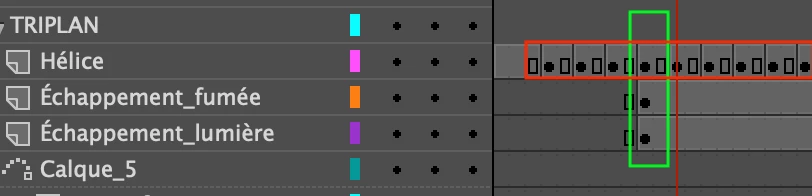
Lorsqu'on sélectionne plusieurs images interpolées sur une même ligne verticale (en vert sur la copie d'écran), on peut les déplacer toutes en même temps.


Lorsqu'on sélectionne plusieurs images interpolées sur une même ligne horizontale (en rouge sur la copie d'écran), une seule se déplace...


Une combinaison de touches devrait avoir raison de ce problème, mais j'ai essayé en vain...


Vos lumières s'il vous plaît !


Hi.

When I select several interpolated images on the same vertical line (in green on the screenshot), I can move them all at the same time.

When I select several interpolated images on the same horizontal line (in red on the screenshot), only one moves...

A key combination should get the better of this problem, but I tried to no avail...

Your lights please!
    This topic has been closed for replies.
    Correct answer JoãoCésar17023019

    Hi.


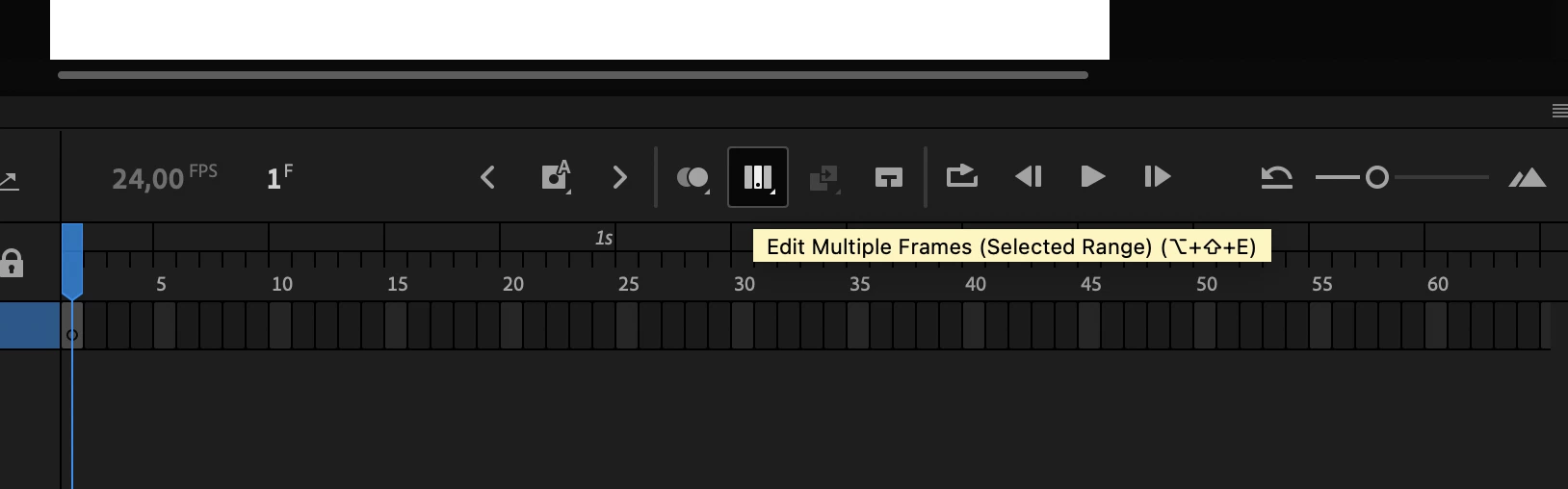
    You need to click and hold on the Edit Multiple Frames button in the upper part of the timeline panel.


    Then drag the handles that will appear. In this way you can select all instances that live in the frames within the range by clicking on them, box selecting or pressing Ctrl/Cmd + A.


    I hope this helps.


    Regards,

    JC

    1 reply

    JoãoCésar17023019
    Community Expert
    JoãoCésar17023019Community ExpertCorrect answer
    Community Expert
    May 23, 2023

    Hi.


    You need to click and hold on the Edit Multiple Frames button in the upper part of the timeline panel.


    Then drag the handles that will appear. In this way you can select all instances that live in the frames within the range by clicking on them, box selecting or pressing Ctrl/Cmd + A.


    I hope this helps.


    Regards,

    JC

    stileriovl94578781
    Known Participant
    May 29, 2023

    Thanks a lot. I didn't see that in the Animate help...

    JoãoCésar17023019
    Community Expert
    Community Expert
    May 29, 2023

    You're welcome.