Participating Frequently
October 30, 2018
Answered

Selection rectangle is rotated in AnimateCC 19

  • October 30, 2018
  • 3 replies
  • 423 views

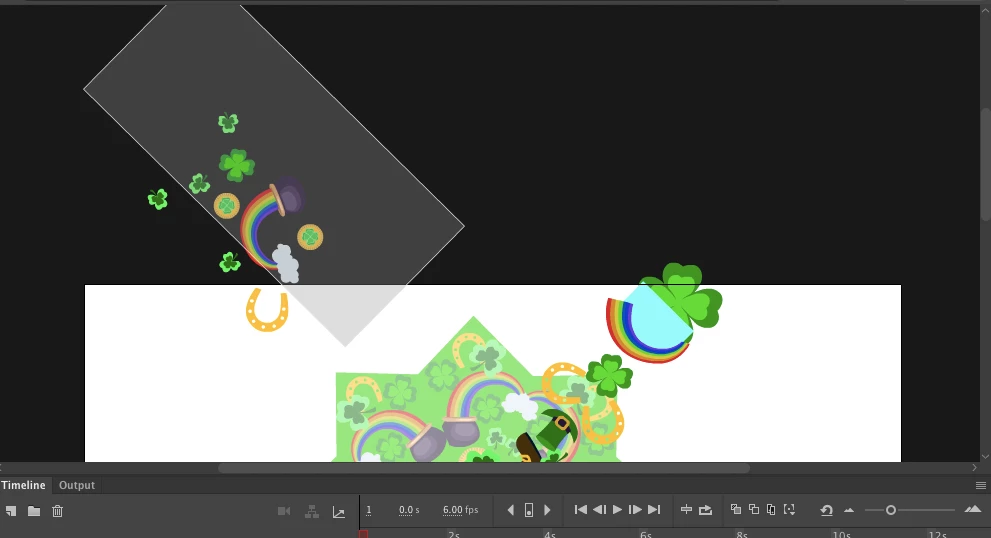
Hi, It seems that in AnimateCC 19, the selection rectangle seems to be rotated to the parent coordinate system. It was not this case previously. Can anyone confirm this?

This topic is closed to new replies. Start a new post to keep the conversation going.
Correct answer UDESCO

We are aware of this issue and it is already open for investigation internally.

3 replies

UDESCO
UDESCOCorrect answer
Participating Frequently
November 2, 2018

We are aware of this issue and it is already open for investigation internally.

Preran
Legend
October 31, 2018

Can you share more information on how to reproduce this issue. I can check it out and let you know.

Thanks,

Preran

Participating Frequently
November 1, 2018

It's simple. Create any document(Canvas or AS3 or AIR) in AnimateCC 19.

Create a rectangle or any other shape and convert it into MovieClip. Go inside the MovieClip and try to select objects by dragging mouse across and observe the selection rectangle is has the same rotation as MovieClip.

I'm not sure if this is a new feature or a bug. I haven't seen this in the earlier versions of animate.    

You can check this behaviour in the sample file here