sandys1348
Inspiring
Nov 29, 2017 1:10 AM UTC
Answered

Selection Tool won't allow selecting individual frame

My selection tool suddenly has a little box next to it and only allows selecting a group of frames such as a tween.  I have to hold the control button to select an individual frame.  I don't know what happened to change it but I can't seem to find any way to reset it.  This is extremely irritating and affecting production when I'm under a deadline.  If anyone can provide information on how I reset this tool I would greatly appreciate your assistance!

Thank you!

    This topic is closed to new replies. Start a new post to keep the conversation going.
    Colin Holgate
    Colin HolgateCorrect answer
    Inspiring
    Nov 29, 2017 5:22 PM UTC

    I had Animate CC 2017 but after my selection tool changed I upgraded to 2018 yesterday thinking the upgrade might reset it but it didn't.  There isn't a Span Selection option in Preferences.


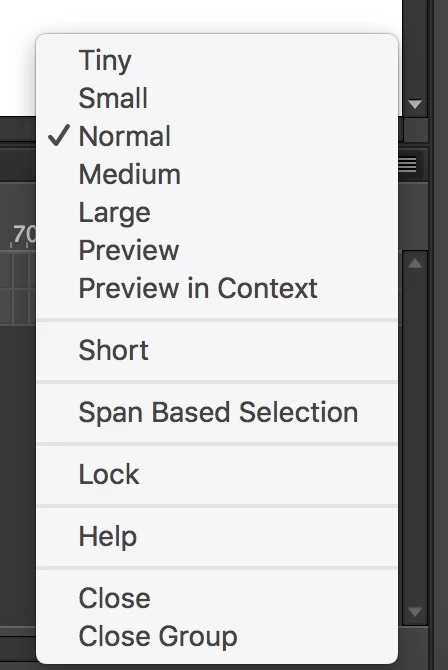
    Found out where it's gone to! Use the menu at the top right of the timeline:

    12 replies

    sandys1348
    Inspiring
    Nov 29, 2017 5:36 PM UTC

    Thank you so much!!!!  That was exactly my problem.  I must have checked it by accident.  I know it seems like a minor issue but it was really a pain!

    Thanks again Colin!!!!

    Translate
    sandys1348
    Inspiring
    Nov 29, 2017 3:36 PM UTC

    Yes it appears when I hover over the timeline and if I click it selects then entire section (tween) instead of one frame.  It wasn't doing that before yesterday.  I had to hold the shift or control to select more than one frame.

    Translate
    _keyframer
    Community Expert
    Community Expert
    Nov 29, 2017 4:51 PM UTC

    Same here Colin.

    It looks like Sandy has an older version of Animate (possibly Flash). I think there was a change in the way span selection worked back then. Sandy, hard for us to trouble shoot without having that version installed but if memory serves me correctly, there's a preference option to turn this off so it works the way you expect it to. Look in Preferences > General... Span Selection (or something similar).

    Translate
    Animator and content creator for Animate CC
    Colin Holgate
    Inspiring
    Nov 29, 2017 5:18 PM UTC

    I have CS3 and CS6 installed, and both did have the span based option:

    Don't know why it's not still there in CC.

    So, Sandy, look at that preferences, and I'm betting the box is currently checked. That does lead to get the box by the cursor that you're seeing.

    Translate
    sandys1348
    Inspiring
    Nov 29, 2017 2:55 PM UTC

    It appears when I hover over anything on the timeline.  I have to hold the control key to select an individual frame.

    Translate
    _keyframer
    Community Expert
    Community Expert
    Nov 29, 2017 2:20 PM UTC

    Can you supply us with a screenshot? I've never heard of this before. The Selection tool has a little box next to it in the toolbar?

    Translate
    Animator and content creator for Animate CC
    Colin Holgate
    Inspiring
    Nov 29, 2017 2:57 PM UTC

    I took it to mean this:

    but I could only get that if there was a selection under the cursor.

    Translate