Inspiring
June 7, 2018
Answered

Set a maximum for a variable for success + Kill a function

  • June 7, 2018
  • 2 replies
  • 1263 views

Hi there,

I have a project in which

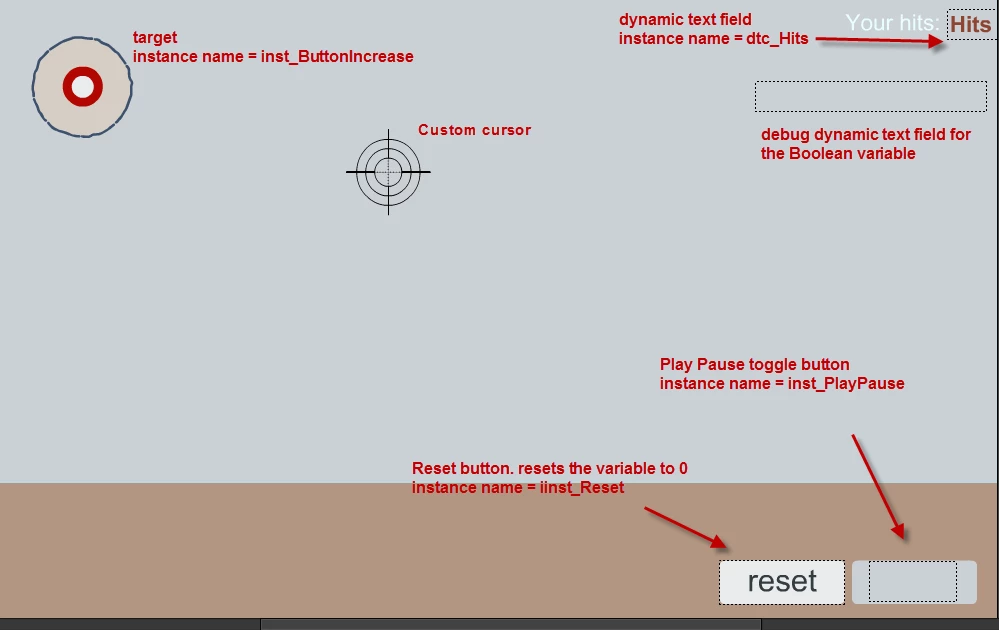
1. I have a custom cursor

2. An object ( moving target) moving randomly.

3. On clicking the object a variable is increased and shown in a dynamic text field.

4. I have a button that stops and plays the movie + also a button that resets the value of the hits variable.

5. A hidden success message. Just an object with a text that would appear once the user hits 10 times the object and increases the variable to 10.

In a way, we can think of it as a game in which someone is shooting on a target.

I have two issues here.

A. I cannot stop the random movement of the target. Must be really a simple thing. The object is set to move with the function

function moveIt(it) {

TweenLite.to(it, (Math.random() * 2) + 0.5, {x:Math.random() * 400, y:Math.random() * 400, onComplete:moveIt, onCompleteParams:[it]});

}

which is started by the Play Pause button.

Here is the code hooked to the Play Pause button

isPlaying is a Boolean to decide if the movie will play or pause

I assign the button labels of the toggle Play Pause button to their instance names  - inst_BtnLabel

this.inst_PlayPause.addEventListener("click", fl_MouseClickHandler.bind(this));

function fl_MouseClickHandler() {

if(isPlaying == false){

this.play;

this.inst_PlayPause.inst_BtnLabel.text = "stop";

this.inst_PlayPause.inst_BtnLabel.mouseEnabled = false;

moveIt(this.inst_ButtonIncrease);

isPlaying = true;

this.debug_Boolean.text = isPlaying;

}

else

{

this.inst_PlayPause.inst_BtnLabel.text = "play";

this.inst_PlayPause.inst_BtnLabel.mouseEnabled = false;

this.stop;

isPlaying = false;

this.debug_Boolean.text = isPlaying;

moveIt(this.inst_ButtonIncrease); //I know that here I need to insert the code that stops the function

}

}

How can I stop the random movement function?

B. I would like to have a maximum/end value of the variable (countHits) which would stop the movie and show a success message.

I have thought of the success message as a movie that is initially hidden.

Once the maximum value (lets say 10) is reached, the hidden movie will start playing and the other movies will stop.

Thanks in advance for the ideas.

B
This topic has been closed for replies.
Correct answer kglad

yes, I see the text changing, so the else statement works, only the line for the tween does not


then you must be using the wrong reference.  try:

TweenLite.killTweensOf(this.inst_ButtonIncrease)

2 replies

Inspiring
June 7, 2018

I have tested a bit and I think it is about the order of lines.

If I use this code, the tween is paused by default.

it.pause();

function moveIt(it) {

TweenLite.to(it, (Math.random() * 2) + 0.5, {

x:Math.random() * 400,

y:Math.random() * 400, onComplete:moveIt,

onCompleteParams:[it]

});

}

moveIt(this.nameOfAnimatedObject);

If put the first line - it.pause(); after the rest, then the tween starts  but would never pause.

The same is if I hook it to a button.

I am missing the logic here ....

Thanks in advance

B

kglad
Community Expert
Community Expert
June 7, 2018

if you're still trying to stop the tweening of 'it', use:

TweenLite.killTweensOf(it);

Inspiring
June 8, 2018

Thank you for the help kglad, but it would not work, This is the code I assign to the play/pause button.

It starts playing, and also it executes the other lines but not the one to kill the tween.

Thanks again

this.inst_PlayPause.addEventListener("click", fl_MouseClickHandler.bind(this));

function fl_MouseClickHandler() {

if(isPlaying == false){

this.play;

this.inst_PlayPause.inst_BtnLabel.text = "stop";

this.inst_PlayPause.inst_BtnLabel.mouseEnabled = false;

moveIt(this.inst_ButtonIncrease);

isPlaying = true;

this.debug_Boolean.text = isPlaying;

}else{

this.inst_PlayPause.inst_BtnLabel.text = "play";

this.inst_PlayPause.inst_BtnLabel.mouseEnabled = false;

this.stop; isPlaying = false;

this.debug_Boolean.text = isPlaying;

TweenLite.killTweensOf(it);

}

}

albertd9194959
Inspiring
June 7, 2018

Hi there.

A: looks like your not evoking the pause function for the tween.

Stop Tween and resume after pause? - GSAP - GreenSock

QuickTip: Basic play / pause toggle button | GreenSock

https://greensock.com/docs/TweenMax/pause

B: One way is to add an if statement to your on clicking object event listener to check max count. on max count pause and make the movie clip visible and play it if there are animations.

Regards,

Inspiring
June 7, 2018

Thank you for that. Lets start from the easier part.

I checked the pause method for TweenLite https://greensock.com/docs/TweenLite/pause()

I understand that I need to stop the tween but am trying a few options and they don't work.
Here is what is the example on the site

//pauses wherever the playhead currently is:

myAnimation.pause();

the instance of the object is inst_ButtonIncrease.

I am trying the following but with no success...

this.inst_ButtonIncrease.pause();

Where is the error?

Thanks again

B

albertd9194959
Inspiring
June 7, 2018

i would suggest dumping a demo scene.

You need to make sure your pausing the tween instance / tween ID. directly on the code above looks like "it".

Not the item id, or the animate symbol name.

Regards,