

Not an alien
Participating Frequently
July 1, 2021
Question

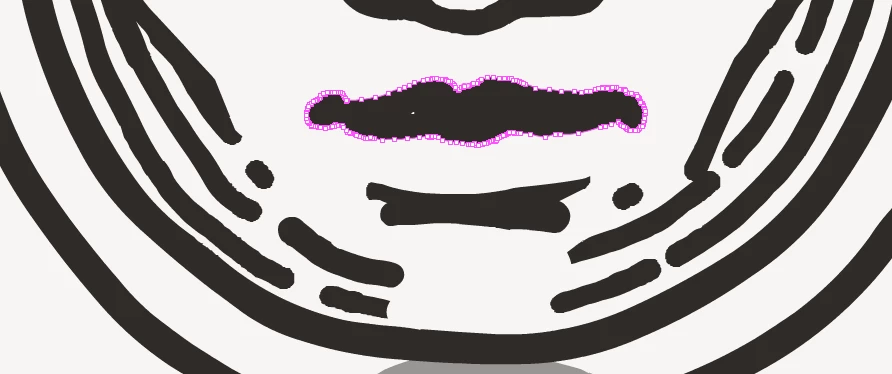
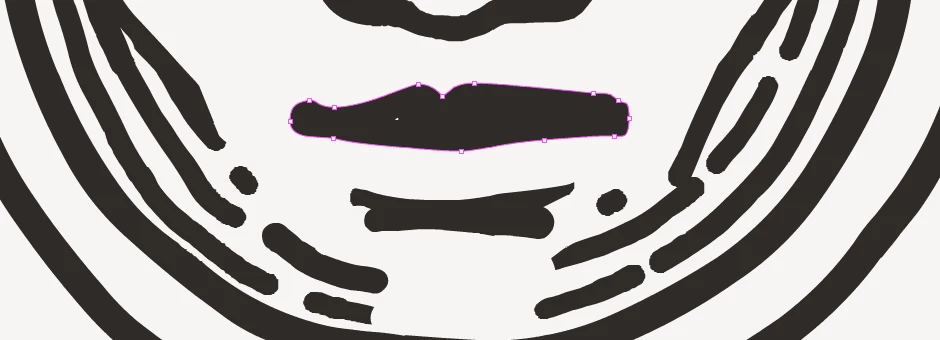
Shape optimize function too agressive.

  • July 1, 2021
  • 2 replies
  • 425 views

Hello, I've noticed that the Shape>Optimize function in adobe Animate is extremely agressive. With a value of 1 it completely changes the drawings.  Is this a bug?  Is there a plug in or something that could help me preserve the nodes a bit more?

In my experience Illustrator's optimize function is much more usable.  I'm working on content that goes into realtime engines and performance is a concern.  But I dont have a solution that is scalable for all the assets I'm drawing in Animate.

Attached a before and after with a strenght of 1
    This topic has been closed for replies.

    2 replies

    Mario_CR
    Community Expert
    Community Expert
    July 2, 2021

    I personally use the smoothen function and assign a custom shortcut for it. Its accuracy depends on the stage zoom though (the closer you get the better it performs).

    There's also a plugin called "chensmooth" that works in a similar fashion: https://exchange.adobe.com/creativecloud.details.12358.chensmooth.html

    Not an alien
    Participating Frequently
    July 4, 2021

    Hey thanks for these tips, incredibly helpful. I had forgotten the smoothen worked that way, and also didn't know that it was affected by the zoom level.

    I did try the chensmooth plugin, but the results are similar to the optimize, I think it might be a shortcut for it?  I got much better results with the smoothen function.  Thanks again!

    Legend
    July 2, 2021

    How are you even making a vectors with that many points in the first place?

    Not an alien
    Participating Frequently
    July 2, 2021

    Hi Clay, 
    With the fluid brush tool, or the classic brush tool.  That is all I use.


    Cheers