angy7228051
Participant
December 20, 2017
Answered

Shortcut "PLAY" key for Library section?

  • December 20, 2017
  • 3 replies
  • 607 views

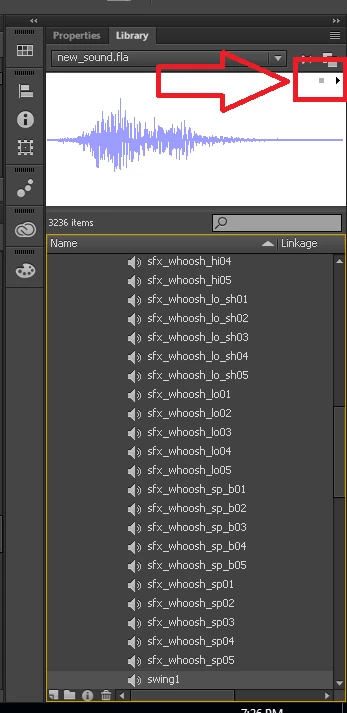
Hello guys! Khai here again! I got some question here, is there any shortcut key for testing the music in library?

like when I want to test a bunch of sound which I downloaded from website, and it install everything in the flash files so I have to test them in adobe animate. But I notice that I have to do one by one using mouse clicking play and clicking another music, that's kinda wasting my time doing it.

I hope there will be some shortcut key, at least to play the music

(Like the frames, we adjust frames by hitting  < and > key. And "enter" is to play the scene.

So I want to ask is there any PLAY  key for library?

Thank you!

    This topic has been closed for replies.
    Correct answer kglad

    I assumed the OP just want to use the feature not implement it.

    To use the panel is as easy as:

    - To copy two files to the WindowSWF folder;

    - (Re)open Animate;

    - Select the panel from the Extensions menu.

    This is not hard.

    It's indeed more complicated if you wish to code the panel for yourself. I just put the code as a reference just in case of some search engine adventurer is passing by.

    I thought about the possibility you suggested but I really don't want to change the user's timeline and playback. Anyway, I would really like to see how you would implement this, k.

    Regards,

    JC


    var tl = fl.getDocumentDOM().getTimeline();

    tl.setSelectedFrames(0,0);

    var layer_index = addLayerF();

    playSoundF(nextSoundF(),layer_index);

    removeLayerF(layer_index);

    function playSoundF(si,layer_index) {

    if(!si){

    return;

    }

    tl.layers[layer_index].frames[0].soundLibraryItem = si;

    if (tl.layers[layer_index].frameCount < 100) {

    tl.insertFrames(100);  // using the undo command in the ide is best way i can see to undo any timeline changes

    tl.currentFrame = 0;

    tl.startPlayback();

    }

    }

    function nextSoundF() {

    var siA = fl.getDocumentDOM().library.getSelectedItems();

    if (siA.length==0) {

    siA = fl.getDocumentDOM().library.items;

    }

    for (var i = 0; i < siA.length; i++) {

    if (siA.itemType == 'sound') {

    return siA;

    }

    }

    alert('end library: no more sounds');

    return null;

    }

    function addLayerF(s) {

    return tl.addNewLayer();

    }

    function removeLayerF(n) {

    tl.deleteLayer(n);

    }

    3 replies

    JoãoCésar17023019
    Community Expert
    Community Expert
    December 20, 2017

    It seems Animate cannot do this with default shortcuts and I couldn't find a method in the JSFL API to handle this.

    The solution I found was to create a simple panel for Animate CC that gets the song url from the authoring environment. Then the SWF panel plays the song using ActionScript 3.

    Download it here: Play Library Sound Extension.

    For now, it only plays the songs if they actually exist in the original path from where they were imported. But I'll try to find some time to update the panel to play the songs without depending on it - if it's possible.

    Installation instructions:

    1. Copy the 'Play Library Sound.swf' and 'play_library_sound.jsfl' files to:

    [INSTALLATION DRIVE]\Users\[USER ACCOUNT]\AppData\Local\Adobe\[ANIMATE VERSION]\en_US\Configuration\WindowSWF.

    Example:

    C:\Users\Admin\AppData\Local\Adobe\Animate CC 2018\en_US\Configuration\WindowSWF

    2. Restart Animate CC if it's opened.

    3. Inside of Animate CC, go to Window > Extensions > Play Library Sound.

    How to use:

    1. Select a sound item in the library to play it.

    For reference, here is the code:

    AS3

    import flash.events.Event;

    import flash.media.Sound;

    import flash.media.SoundChannel;

    import flash.media.SoundTransform;

    import flash.net.URLRequest;

    import flash.errors.IOError;

    import flash.events.IOErrorEvent;

    var sChannel:SoundChannel;

    var previousSoundPath:String;

    var soundPath:String;

    function start():void

    {  

        ExternalInterface.addCallback('callMySWF', jsfl);  

        stage.addEventListener(Event.ENTER_FRAME, loop);

    }

    function loop(e:Event):void

    {  

        MMExecute('fl.runScript( fl.configURI + "/WindowSWF/play_library_sound.jsfl");');


        if (previousSoundPath != soundPath)

        {

            if (sChannel)

                sChannel.stop();


            songName.text = soundPath;

            playSound(soundPath);

        }      


        previousSoundPath = soundPath;

    }

    function jsfl(arg:String):void

    {

        soundPath = arg.replace("file:///", "").replace("|", ":");

    }

    function playSound(path:String, volume:Number = 1, start:Number = 0, loops:int = 0):void

    {

        if (sound) sound.removeEventListener(IOErrorEvent.IO_ERROR, errorHandler);

        if (sChannel) sChannel.stop();  


        var sound:Sound = new Sound();  

        var sTransform:SoundTransform = new SoundTransform();      


        sound.load(new URLRequest(path));

        sChannel = sound.play(start, loops);

        sTransform.volume = volume;

        sChannel.soundTransform = sTransform;


        sound.addEventListener(IOErrorEvent.IO_ERROR, errorHandler);

    }

    function errorHandler(event:IOErrorEvent):void

    {

        if (soundPath != "Select a sound item in the Library.")

            songName.text = soundPath + " not found.";

    }

    start();

    JSFL

    fl.outputPanel.clear();

    var soundURL = "";

    function soundPath()

    {

        var doc = fl.getDocumentDOM();

        var errorMessage = "Select a sound item in the Library.";


        if (doc.library.getSelectedItems()[0] && doc.library.getSelectedItems()[0].itemType == "sound")

        {

            fl.trace(doc.library.getSelectedItems()[0].sourceFilePath);

            return doc.library.getSelectedItems()[0].sourceFilePath;

        }      

        else

        {

            fl.trace(errorMessage);

            return errorMessage;

        }      

    }

    function callMyPanel(panelName, arg)

    {  

        if(fl.swfPanels.length > 0)

        {

            for(i = 0; i < fl.swfPanels.length; i++)

            {

                if(fl.swfPanels.name == panelName)

                {

                    fl.swfPanels.call("callMySWF", arg);

                    break;

                }

            }

        }

        else

            fl.trace("no panels");

    }

    soundURL = soundPath();

    callMyPanel("Play Library Sound", soundURL);

    Regards,

    JC

    kglad
    Community Expert
    Community Expert
    December 21, 2017

    jsfl can do it alone and (imo) easier than that.  select the library sound>select frame> attach the sound to a frame>add frames (if needed)>start frame playback>stop frame playback>remove the sound (ie, add null), repeat.  put the jsfl the commands folder and create a shortcut.

    and that's not necessarily the easiest solution, but it's easier than the solution you proposed.

    JoãoCésar17023019
    Community Expert
    Community Expert
    December 21, 2017

    I assumed the OP just want to use the feature not implement it.

    To use the panel is as easy as:

    - To copy two files to the WindowSWF folder;

    - (Re)open Animate;

    - Select the panel from the Extensions menu.

    This is not hard.

    It's indeed more complicated if you wish to code the panel for yourself. I just put the code as a reference just in case of some search engine adventurer is passing by.

    I thought about the possibility you suggested but I really don't want to change the user's timeline and playback. Anyway, I would really like to see how you would implement this, k.

    Regards,

    JC

    robdillon
    Participating Frequently
    December 20, 2017

    Here’s the link to all of the existing keyboard shortcuts in Animate: Adobe Animate CC keyboard shortcuts

    and here’s the link to creating your own custom shortcuts: Keyboard shortcuts

    kglad
    Community Expert
    Community Expert
    December 20, 2017

    you might be able to add a jsfl shortcut to do that.  otherwise, no.