
sunghoon jung
Known Participant
June 13, 2019
Answered

Shortcut to escape from a symbol

  • June 13, 2019
  • 1 reply
  • 1958 views

I use the Wacom tablet to create animations.

To edit the symbol contents in the last few days, I knocked the symbol twice with the pen, and once I finished editing, I knocked the blank part of the stage twice to go back to the scene again.

I felt like this double click was cumbersome, so I wanted to set shortcuts.
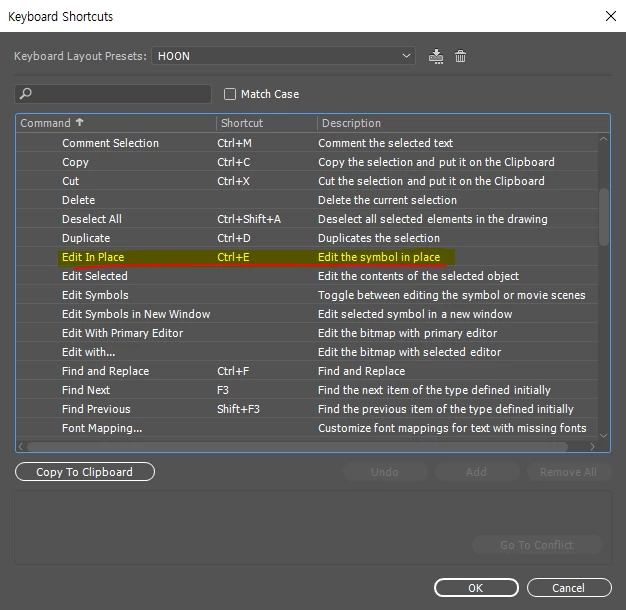
'Edit in place' worked well for me to enter the symbol. it's good.

But I have not found the ability to go back to the parent directory again.
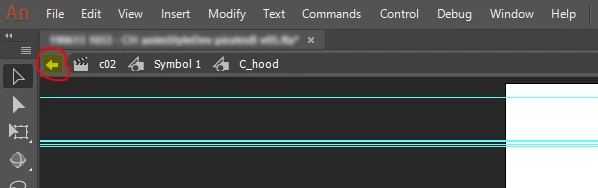
I would be happy if I could assign a shortcut to this button.

However, even if I hover my cursor over that icon, there is no information popup and I can not find out the name.

Please let me know if you know how to assign a shortcut to that function.

Thank you in advance.

This topic has been closed for replies.
Correct answer n. tilcheff

Hi mate,

You can save this as a JSFL command and assign a shortcut to it:

// Exit Edit Mode

an.getDocumentDOM().exitEditMode();

Hope this helps!

1 reply

n. tilcheff
n. tilcheffCorrect answer
Legend
June 13, 2019

Hi mate,

You can save this as a JSFL command and assign a shortcut to it:

// Exit Edit Mode

an.getDocumentDOM().exitEditMode();

Hope this helps!

Nick - Character Designer and Animator, Flash user since 1998 | Member of the Flanimate Power Tools team - extensions for character animation
sunghoon jung
Known Participant
June 13, 2019

The power of the code. Excellent for solving problems!

Thank you for writing the script.

This script works very well for my situation.

However, I now need to assign two shortcut keys for 'Edit In Place' and 'Exit Edit Mode.jsfl'. I think the situation can be refined by introducing the toggle paradigm.

I would like to ask you if it is possible with JSFL:

Is it possible to create a function that performs different actions depending on conditions in a single shortcut?

For example, if the mouse cursor is on a symbol, it will enter the symbol when i press the E key. But if the cursor is in the empty space on the stage, it will escape the symbol when i press the same E key .

As far as I know, AC 3.0 has the ability to detect cursor and symbol overlaps. I am curious to know if it is possible with JSFL.

Please tell me your opinion.

n. tilcheff
Legend
June 13, 2019

It should be possible.

To make it function flawlessly however, you will need to implement a few checks.

You will require a selection of a single item. If it is a symbol, then enter.

If no selection and inside symbol - exit. (In my opinion this defeats the purpose of the toggle, because it forces you to always click outside to deselect so you don't escape the extra click.)

BTW, simple functions like this are available in the History panel.

You can save them as commands, similar to Photoshop actions.

Nick - Character Designer and Animator, Flash user since 1998 | Member of the Flanimate Power Tools team - extensions for character animation