
anniecr
Participant
April 6, 2022
Answered

Shrink menu dialog boxes in Animate

  • April 6, 2022
  • 1 reply
  • 470 views

The menu dialog boxes open too large for my screen and I can't confirm any of my choices. The OK and cancel buttons are below the screen.

How do I resize them???

I've tried dragging to shrink and resetting some preferences, but nothing has worked.


-Annie
    This topic has been closed for replies.
    Correct answer n. tilcheff

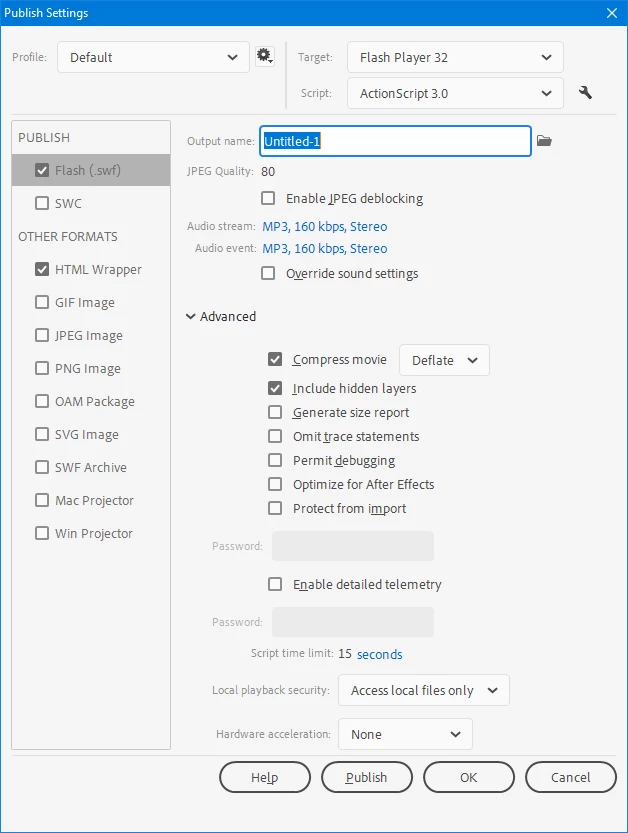
    Yes, they all have buttons at the bottom, Annie.


    For a short period of time you can rotate the screen 90° to see those dialogs and set them, but it is not a real long-term solution. You can do this from Windows Settings again. It will then become 768x1366 and you will have enough vertical pixels.


    The UI in animate was changed to this bloated monstrosity in Animate 2020 and this has been a problem ever since.

    Unfortunately, you will need a 1920x1080 monitor to be able to comfortably use Animate.


    Here is how Publish Settings should look like:


    1 reply

    n. tilcheff
    Legend
    April 6, 2022

    Hi Annie,


    First thing to check is 'display scaling' in your OS settings.

    On Windows right-click the desktop and choose "Display Settings", then look for "Scale and layout" and make sure that is at 100%. 

    If display scaling is at 100%, you may need to buy and plug in an external monitor with higher resolution. 1920x1080 is very common these days and should be enough to fit in all dialogs.


    Nick - Character Designer and Animator, Flash user since 1998 | Member of the Flanimate Power Tools team - extensions for character animation
    anniecr
    anniecrAuthor
    Participant
    April 6, 2022

    Thanks for responding, Nick

    I have the screen resolution on my laptop set as high as it will go--1366x768.

    Does the Publish Settings dialog box in Animate even have an 'OK', 'Apply' or 'Cancel' button at the bottom?

    There's a settings drop down menu in the dialog box, but I would have to save the settings under a new name.


    THX, Annie

    n. tilcheff
    n. tilcheffCorrect answer
    Legend
    April 7, 2022

    Yes, they all have buttons at the bottom, Annie.


    For a short period of time you can rotate the screen 90° to see those dialogs and set them, but it is not a real long-term solution. You can do this from Windows Settings again. It will then become 768x1366 and you will have enough vertical pixels.


    The UI in animate was changed to this bloated monstrosity in Animate 2020 and this has been a problem ever since.

    Unfortunately, you will need a 1920x1080 monitor to be able to comfortably use Animate.


    Here is how Publish Settings should look like:


    Nick - Character Designer and Animator, Flash user since 1998 | Member of the Flanimate Power Tools team - extensions for character animation