


Inspiring
March 12, 2021
Answered

Simple Analog clock

  • March 12, 2021
  • 9 replies
  • 3869 views

Hi - I wonder if someone can help me. I am trying to create a simple analog clock (with real time) for a static scene that I am creating. I am totally new to Adobe Animate (Canvas) so I have no clue how to write code for a real analog clocks that appears in a scene. I have searched the Internet for many weeks now to no avail. Please help Many thanks.
    This topic is closed to new replies. Start a new post to keep the conversation going.
    Correct answer kpabble

    Hi!


    You're welcome!


    The first message is telling you that my FLA has been created in a newer version of Animate. You can just click OK.


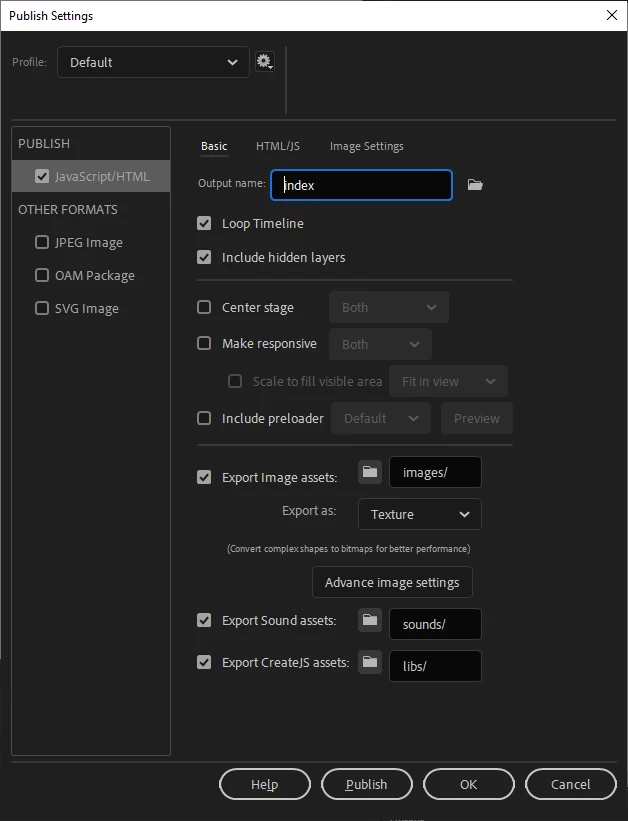
    The second message is shown because I set the FLA to output to a folder called dist. You can either create a folder called dist where your FLA is located or you can just go to the Publish Settings (Ctrl/Cmd + Shift + F12) and change the output to index or another name/path of your choice.


    Please let me know if you are still unable to publish the document.


    Regards,

    JC


    Good afternoon JC - just wanted to let you know your're a diamond! I simply upgraded my Adobe Animate to 2021 and your file opened (and is working) like a charm!!! Thanks you so much for your help have a great day!

    9 replies

    JoãoCésar17023019
    Community Expert
    Community Expert
    March 14, 2021

    Hi.


    Here is a sample of an analog clock for Adobe Animate using the HTML5 Canvas document.


    Preview:


    Try it:

    http://bit.ly/3bNp4qi


    Javscript / JS code:

    var root = this;
    
    root.main = function()
    {
    	document.body.style.backgroundColor = lib.properties.color;
    	root.stop();
    	root.analogClock = new root.AnalogClock(root.clock.seconds, root.clock.minutes, root.clock.hours);
    };
    
    root.AnalogClock = function(secondsHand, minutesHand, hoursHand, stop)
    {
    	this.secondsHand = secondsHand;
    	this.minutesHand = minutesHand;
    	this.hoursHand = hoursHand;
    	
    	if (!stop)
    		this.start();
    };
    
    root.AnalogClock.prototype.start = function()
    {
    	this.update();
    	this.stop();
    	this.interval = setInterval(this.update.bind(this), 1000);
    };
    
    root.AnalogClock.prototype.stop = function()
    {
    	clearInterval(this.interval);
    };
    
    root.AnalogClock.prototype.update = function()
    {
    	var now = new Date();
    	
        // seconds
    	this.second = now.getSeconds();
        this.second = (this.second * Math.PI / 30);
    	this.secondsHand.rotation = this.second * 180 / Math.PI;
    	
    	// minutes
    	this.minute = now.getMinutes();
        this.minute = (this.minute * Math.PI / 30) + (this.second * Math.PI / (30 * 60));
    	this.minutesHand.rotation = this.minute * 180 / Math.PI;
    	
    	// hours
    	this.hour = now.getHours();
        this.hour = this.hour % 12;
        this.hour = (this.hour * Math.PI / 6) + (this.minute * Math.PI / (6 * 60)) + (this.second * Math.PI / (360 * 60));
    	this.hoursHand.rotation = this.hour * 180 / Math.PI;
    };
    
    root.main();


    Source / files / download:

    https://github.com/joao-cesar/adobe/tree/master/animate%20cc/html5_canvas/analog_clock


    Please let us know if you need something else.


    Regards,

    JC

    kpabbleAuthor
    Inspiring
    March 15, 2021

    Good morning JC - thank you so much for your "SPOT ON" resolve. It's exactly what I need!!! However when I try to open with Adobe Animate 2020 I get IMAGE 1. When I try to test movie from Adobe Animate 2020 I get image 2...what am I doing wrong 😩

    JoãoCésar17023019
    Community Expert
    Community Expert
    March 15, 2021

    Hi!


    You're welcome!


    The first message is telling you that my FLA has been created in a newer version of Animate. You can just click OK.


    The second message is shown because I set the FLA to output to a folder called dist. You can either create a folder called dist where your FLA is located or you can just go to the Publish Settings (Ctrl/Cmd + Shift + F12) and change the output to index or another name/path of your choice.


    Please let me know if you are still unable to publish the document.


    Regards,

    JC

    kpabbleAuthor
    Inspiring
    March 13, 2021

    Hi Vladin M Mitove- many thanks for your reply. I am new to this so I am not sure what I must do with the information you have sent me and how it relates to Adobe Animate 2020?

    Vladin M. Mitov
    Inspiring
    March 12, 2021
    - Vlad: UX and graphic design, Flash user since 1998Member of Flanimate Power Tools team - extensions for character animation