
Participant
February 21, 2024
Answered

Simple beginners question.... I hope

  • February 21, 2024
  • 2 replies
  • 372 views

I'm a very new person learning Adobe Animate. I've gone through a lot of tutorials all over and have not found a soultion to what I think should be an easy answer.


I'm trying to make a tire rotate across my screen. I have an upright one on the left and right and an upside down one in the middle. When I animate this, the rotation starts out great until if it gets halfway. In the second half the tire does rotate to the one off the page on the right but it's rotating the opposite direction. Does anyone have a suggestion on how to make this rotate correctly? Thanks!
    Correct answer n. tilcheff

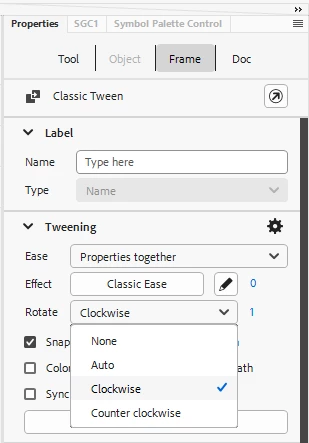
    Click in the middle of your problematic Classic Tween, then from Properties specify direction:


    You can also type a number higher than 1 in the field next to the drop-down.

    In fact, you don't need the middle keyframe. You can do one or more full turns with just two keys.


    2 replies

    Participant
    July 4, 2025

    Man, I’m still kinda new to Animate too, but I think I ran into somethin' like that when I was messing with a snow scene was trying to animate a set of winter tires rolling across a road. Mine flipped direction halfway through just like yours. Turns out, I didn’t tween the rotation proper it was doing a 180 the wrong way instead of full 360. Try setting the rotation direction manually to ‘CW’ or 'CCW', whichever matches the movement. Fixed it for me. Hope it helps!

    n. tilcheff
    n. tilcheffCorrect answer
    Legend
    February 21, 2024

    Click in the middle of your problematic Classic Tween, then from Properties specify direction:


    You can also type a number higher than 1 in the field next to the drop-down.

    In fact, you don't need the middle keyframe. You can do one or more full turns with just two keys.


    Nick - Character Designer and Animator, Flash user since 1998 | Member of the Flanimate Power Tools team - extensions for character animation
    Participant
    February 22, 2024

    n. tilcheff,


    Thanks for that quick answer and your solution worked perfectly. My next step is to make the tire role into a word for the letter O. When I selct the Rotate Clockwise the entire tire relvolves around itslef like rotating around a planet but it does take the correct spot. Is there a place I can tell it to spin and not roatate? Thanks again!