stevenh46490680
Participant
February 14, 2019
Answered

Simple button won't work

  • February 14, 2019
  • 4 replies
  • 756 views

Hi

I'm new to Animate

I'm trying to start simple

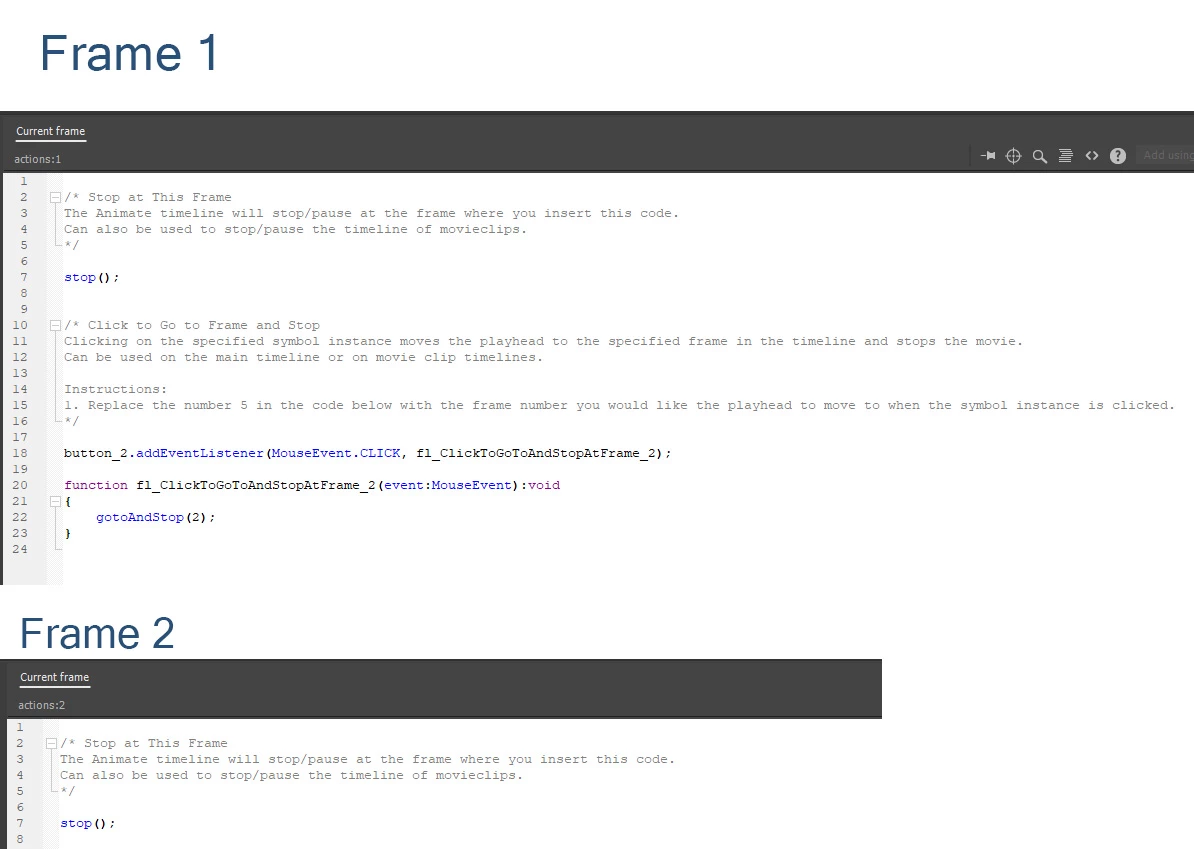
A two frame timeline with a button_2 on frame one that is suppose to send the viewer to frame 2.

Can anyone tell me why this isn't working?

thanks
This topic has been closed for replies.
Correct answer avid_body16B8

Here is a file I made for you.

https://app.box.com/s/20lmoyxncg5wkkptpvqog4o7p0hcq744

4 replies

Participant
February 20, 2019

You made a file for me? Thank you so much. I figured it out and my buttons are working now! You're the best!

avid_body16B8
avid_body16B8Correct answer
Legend
February 15, 2019
avid_body16B8
Legend
February 15, 2019

Do you get any error in the console?

JoãoCésar17023019
Community Expert
Community Expert
February 14, 2019

Hi.

Everything seems correct to me.

Are you using an AS3 or an HTML5 Canvas document?

Can you please check this?

Regards,

JC

Participant
February 15, 2019

Thanks very much for the help JC

The original document was AS3.

I tried re-creating it starting off as HTML5 and got similar result.

I did get an output warning in the HTML5 version, It is this:

WARNINGS:

** 6 Bitmaps packed successfully into 1 spritesheet(s).

Frame numbers in EaselJS start at 0 instead of 1. For example, this affects gotoAndStop and gotoAndPlay calls. (4)

Content with both Bitmaps and Buttons may generate local security errors in some browsers if run from the local file system.

Thanks again

Steve

Inspiring
February 15, 2019

Hi,

remember frames in HTML5 Canvas start at 0. So if it was frame 1 on AS3 then it will be frame 0 in HTML5.

Also, some browsers like Chrome and Firefox have security that might stop your buttons working. Can you test from a server?

This is really all what the Warning was saying.

Cheers.
