
Timmonsxp
Known Participant
November 27, 2017
Answered

Sound Help!

  • November 27, 2017
  • 2 replies
  • 698 views

Hello everyone. I'm having trouble with some sound on my Timeline. I'm sure there is a code to get it the way I want but I don'y know it.
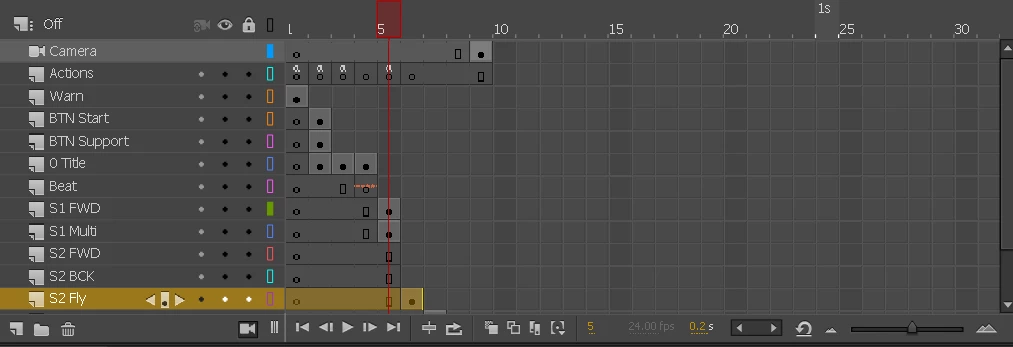
So basically here is what I want.

On the Layer "Beat" I have music set on Stream because I want it to play forever.

When I get to Frame 5 "S1 Multi" The sounds and animation for that MC plays fine. Also Beat Continues to play like I want.

On Frame 5 I also have a button that is stand alone. On its own layer. If you click it, it navigates you to the next MC on Frame 6 "S2 Fly"

The problem is. The music gets carried over from Frame 5 "S1 Multi" and jumbles in with Frame 6 "S2 Fly" because it doesn't know it needs to stop.

But if I insert a :

import flash.media.SoundMixer;

SoundMixer.stopAll();

It will also stop "Beat" which I want to play forever.

So I can't find a way to stop music playing within a Move Clip. That way it doesn't carry on into another Movie Clip.

This topic has been closed for replies.
Correct answer Colin Holgate

Colin Holgate​ Where you at? Haha. Help me buddy.


Here's a different approach:

Make the sounds inside the movieclips be Stream.

Make Beat be Event, and looped.

In the script that takes you from frame 5 to 6, include something that stop "S1 Multi" and starts playing "S3 Fly" after you have gone to frame 6.

Something like:

btn.addEventListener(MouseEvent.CLICK, gosix);

function gosix(e:MouseEvent){

   btn.removeEventListener(MouseEvent.CLICK, gosix);

   s1multi.stop();

   gotoAndStop(6);

  s3fly.play();

}

The s1multi and s3fly would be the names you have given the movieclips.

2 replies

Legend
November 27, 2017

/throws hands up in despair

Timmonsxp
TimmonsxpAuthor
Known Participant
November 27, 2017

Haha. Thanks both of you!

Legend
November 27, 2017

Timmonsxp  wrote

On the Layer "Beat" I have music set on Stream because I want it to play forever.

That's the opposite of what Stream does. Stream locks sound playback to the playhead position.

Read the documentation: How to use sound in Adobe Animate CC

- Event plays a sound every time the playhead hits where the sound keyframe is.

- Start plays a sound like Event does, but not if the sound is already playing.

- Stop stops the specified sound.

- Stream syncs sound with the playhead.

Sounds like maybe you need a Stop frame.

Timmonsxp
TimmonsxpAuthor
Known Participant
November 27, 2017

The Movie Clips are all loops until you navigate to the next Via Button. So stopping it would make the sound go away where ever you place it. So if the user isnt ready to navigate. The sound may or may not stop when they are ready to progress.

Timmonsxp
TimmonsxpAuthor
Known Participant
November 27, 2017

I need some kind of sound mixer stop all but only for specific movie clips if that were possible. Not sure. haha that's why i'm asking.