Participating Frequently
May 22, 2019
Answered

Sprites in sprite sheet in unordered way

  • May 22, 2019
  • 2 replies
  • 3048 views

When generating sprite sheet from a movie clip in the library the sprites in the sheet ends up in an other order than in the animation. This makes it impossible to use them in an easy way in Unity. Does anyone know what I can do to fix this?

    This topic has been closed for replies.
    Correct answer kglad

    Yes, I checked the link. Well, I don't publish the datafile. I'm only after the actual sprite sheet, i.e. the png-file. And then I am dependant on the sprites ending up in order. I still don't get why Adobe Animate does not have the option  for a solitaty png-file with sprites in order...?


    imagine the situation where each sprite consists of several non-contiguous identical shapes.  now imagine showing that spritesheet to someone unfamiliar with your animation.  how can they determine where one sprite starts and stops and another begins?

    answer:  they can't if they just look at the spritesheet.  they need a data sheet that supplies that info.

    for example, here's the spritesheet for a movieclip that consists of green circles.  no matter how they're ordered you can't determine frame 1, 2 etc.  you can't even determine how many frames are in the animation.
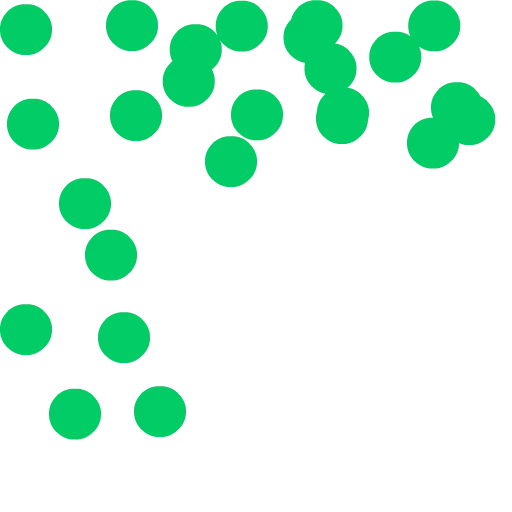
    you need the data file:

    <?xml version="1.0" encoding="utf-8"?>

    <TextureAtlas imagePath="Untitled-2.png">

    <!-- Created with Adobe Animate version 19.2.0.405 -->

    <!-- http://www.adobe.com/products/animate.html -->

    <SubTexture name="Symbol 10000" x="0" y="0" width="162" height="229" pivotX="4" pivotY="4" frameX="0" frameY="0" frameWidth="195" frameHeight="229"/>

    <SubTexture name="Symbol 10001" x="162" y="0" width="121" height="187" frameX="-28" frameY="-20" frameWidth="195" frameHeight="229"/>

    <SubTexture name="Symbol 10002" x="283" y="0" width="86" height="144" frameX="-50" frameY="-41" frameWidth="195" frameHeight="229"/>

    <SubTexture name="Symbol 10003" x="369" y="0" width="127" height="169" frameX="-33" frameY="-30" frameWidth="195" frameHeight="229"/>

    <SubTexture name="Symbol 10004" x="0" y="229" width="186" height="211" frameX="-9" frameY="-7" frameWidth="195" frameHeight="229"/>

    </TextureAtlas>

    2 replies

    rayek.elfin
    Legend
    May 24, 2019

    If you need more control over your sprite sheet generation, I wholeheartedly suggest getting a copy of TexturePacker. Saves me a LOT of time dealing with spritesheets in game engines. Works great with Unity (dedicated Unity exporter).

    Filenames and folders are very helpful in controlling the spritesheet layout automatically. And by setting up a watched folder TP will automatically update your spritesheet(s) when changes are made to the graphics.

    SWF files are supported, and spritesheets at different scaling variants are supported as well.

    Takes the frustration out of spritesheeting.

    TexturePacker - Create Sprite Sheets for your game!

    Participant
    June 29, 2020

    I had a similar problem in Animate generated spritesheet (for Unity too), it's now ok but there's still a logical error to me that slows down my workflow. I make several PNG sequences in After Effect to have all the animations of a character, then I import it in the Animate library to mixed it and generate the spritesheet of the character and finally import it in Unity. Sprites imported are placed in alphabetical order so globally it's OK, except for numbers logic. I have my PNGs named "Character_Idle_0" and so on, "Character_Shot_0", etc. that I combined on the spritesheet generated in Animate. The problem is that "Character_Shot_10" does not appear next to "Character_Shot_9" but next to "Character_Shot_1", because it follow the 1. I have 12 pictures for my spritesheet, so rather than naming the last "Character_Shot_10" and "Character_Shot_11", I need to named it "Character_Shot_90" and "Character_Shot_91", what is really disturbing, I didn't find a way to change this.

    kglad
    Community Expert
    Community Expert
    May 22, 2019

    there's nothing to fix.  you just need to learn how to use sprite sheets:  Adobe Animate | How to export sprite sheet and Texture atlas from Animate - YouTube

    BotiladaAuthor
    Participating Frequently
    May 23, 2019

    Nothing to fix? Meaning it is logical that the individual sprites end up in an order not at all corresponding to the natural order in a movie clip, i.e. first frame first e.t.c?

    kglad
    Community Expert
    Community Expert
    May 23, 2019

    did you check the link?  summary: you publish a data file (eg, json) with the spritesheet that contains the needed info.


