


Participant
Jul 12, 2023 4:26 AM UTC
Answered

Static text font issue. blank spaces are being filled in solid. (pls see attachment)
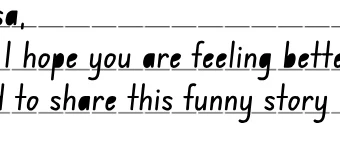
  Hi there. This a first time post for me. I am using a new font but when I render out to the canvas, it is filling in certain spaces as solid instead of transparent.


- This is being rendered out as a clickable interactive. html5 canvas.

- Using Static text. Dynamic text fixes it but alignment issues are then a problem. 

- This text is in a movie clip.

- I have tried converting the foundation.ttf font to an otf font as well but still doing the same.


Any ideas to fix?
    Craig31025326a9a4Correct answer
    Participant
    Jul 19, 2023 1:30 AM UTC

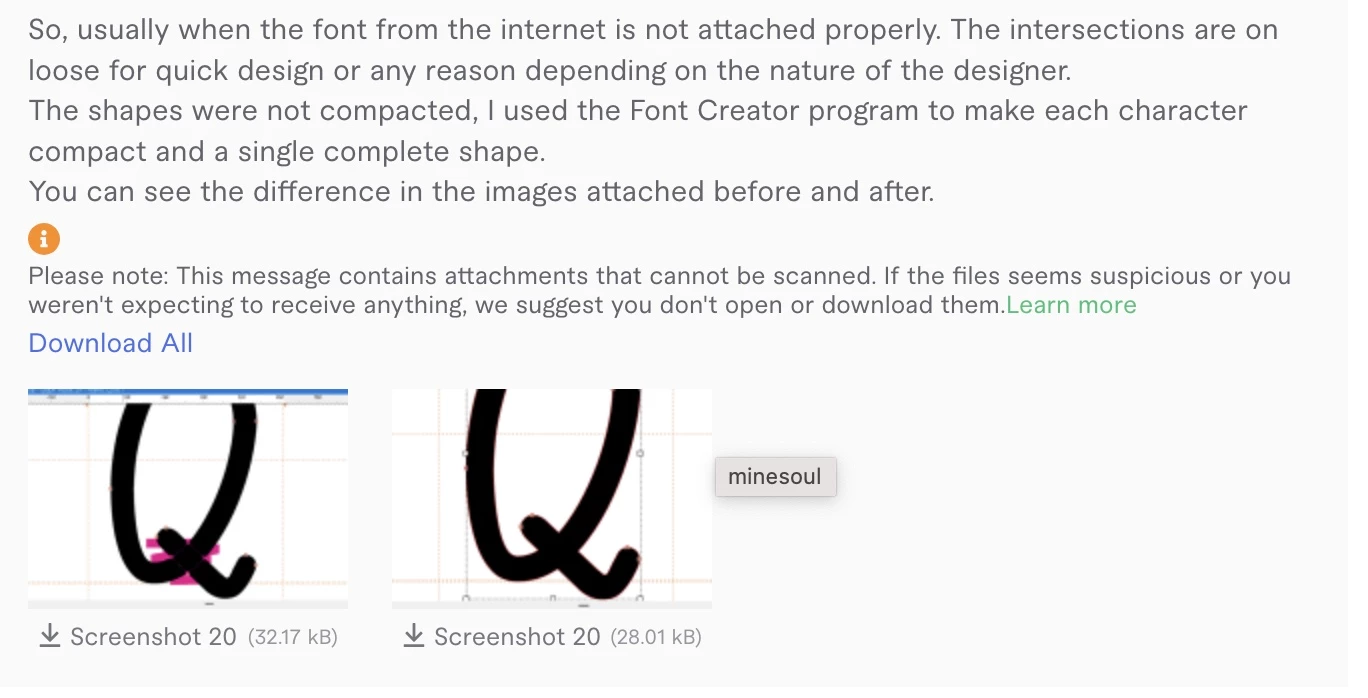
    Hello again everyone. So i found someone on fiverr to be able to do the following to the original font file that was used.

    For anyone with the same issue above, please see this attachment.  

    8 replies

    Craig31025326a9a4AuthorCorrect answer
    Participant
    Jul 19, 2023 1:30 AM UTC

    Hello again everyone. So i found someone on fiverr to be able to do the following to the original font file that was used.

    For anyone with the same issue above, please see this attachment.  

    Translate
    kglad
    Community Expert
    Community Expert
    Jul 19, 2023 2:27 PM UTC

    so, compacting the font solved the problem?

    Translate
    Participant
    Jul 19, 2023 10:42 PM UTC

    Yes. This fixed the issue and now the static font exports nicely to the html page.

    Translate
    Mario_CR
    Community Expert
    Community Expert
    Jul 14, 2023 6:35 AM UTC

    Another option is to copy the text in Illustrator and convert it to outlines by going to Type > Create Outlines, then copy-paste it back into Animate.

    Translate
    kglad
    Community Expert
    Community Expert
    Jul 12, 2023 4:33 AM UTC

    use a bitmap of the text or trace the text bitmap if scaling is an issue.

    Translate
    Participant
    Jul 12, 2023 6:03 AM UTC

    Thank you very much for your reply. Appreciated and some good options.


    I tried the above and yes, converting to bitmap works (even better if i scale up the text to 400% before hand to keep the res a lot sharper).


    But in terms of keeping it still vectorised. I tried breaking apart. Twice. One to the seperate letters. Then again to vector shape but then this fill issue occurred. 


    Maybe a font file issue. But would love to know if anyone has found a work around for other fonts if this has happened to them. 


    Translate
    kglad
    Community Expert
    Community Expert
    Jul 12, 2023 3:10 PM UTC

    vectorize your bitmap using modify>bitmap>trace bitmap.

    Translate