
Inspiring
February 21, 2022
Answered

strange movie clip behavior on drag

  • February 21, 2022
  • 1 reply
  • 274 views

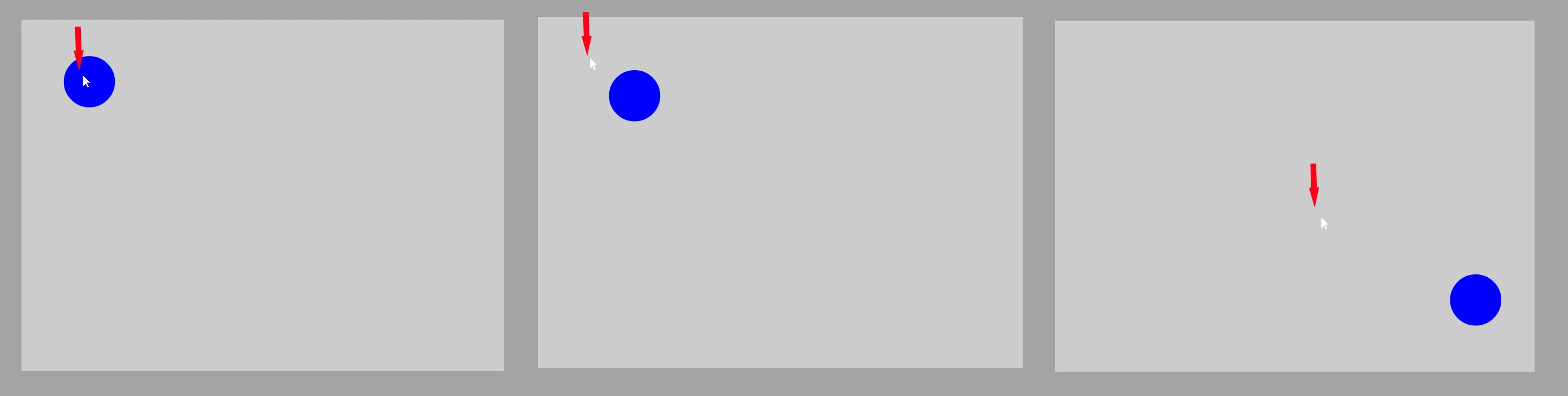
Hi, I am trying to implement drag and drop in Animate Canvas, using JavaScript.  I am using the code below to grab a movie clip and move it around.  The mouse does grab the clip and move it, but as I drag towards the lower right of the stage, the mouse pointer gets farther and farther away from the movie clip (see JPG).  Here's my code.  Is there a fix for this?  Thanks.

Zaffer

this.blueBall_1.on("pressmove", moveBlueBall);

function moveBlueBall(e){
	
	e.currentTarget.x = e.stageX;
	e.currentTarget.y = e.stageY;
	
}
 

This topic has been closed for replies.
Correct answer Zaffer

Thanks Niktendo,

It's not a problem with registration.  Its a problem with globalToLocal.  You have to set the main timeline (exportRoot) global coordinates to local coordinates.  This code makes dragging the blue ball work perfectly:

let blueBall = this.blueBall_1;
let pt;

blueBall.addEventListener("pressmove", moveBlueBall.bind(this));

function moveBlueBall(e){
	blueBall = e.currentTarget;
	pt = exportRoot.globalToLocal(e.stageX, e.stageY);
	e.currentTarget.x = pt.x;
	e.currentTarget.y = pt.y;
}


1 reply

Community Expert
February 21, 2022

 Make sure your registration point is in the middle of the ball.


ZafferAuthorCorrect answer
Inspiring
February 22, 2022

Thanks Niktendo,

It's not a problem with registration.  Its a problem with globalToLocal.  You have to set the main timeline (exportRoot) global coordinates to local coordinates.  This code makes dragging the blue ball work perfectly:

let blueBall = this.blueBall_1;
let pt;

blueBall.addEventListener("pressmove", moveBlueBall.bind(this));

function moveBlueBall(e){
	blueBall = e.currentTarget;
	pt = exportRoot.globalToLocal(e.stageX, e.stageY);
	e.currentTarget.x = pt.x;
	e.currentTarget.y = pt.y;
}