dinid47383756
Participant
March 21, 2017
Answered

Swf in full screen For browser

  • March 21, 2017
  • 2 replies
  • 2486 views

Hello, i been working on my project i been trying to make this file on full screen for more than 2 months but isnt working please can anyone here help me and tell me what im doin wrong here is my code!

<script type='text/javascript'>

function onFailFlashembed() {

    var inner_html = '<div class="flashFailHead">Instala el Adobe Flash Player</div>\n\

    <div class="flashFailHeadText">Para jugar a DarkOrbit, necesitas el Flash Player m�s actual. �Solo tienes que instalarlo y empezar a jugar!\n\

    <div class="flashFailHeadLink" style="cursor: pointer">Desc�rgate aqu� el Flash Player gratis: <a href=\"http://www.adobe.com/go/getflashplayer\" style=\"text-decoration: underline; color:#A0A0A0;\">Descargar Flash Player<\/a> </div></div>';

    document.getElementById('container').innerHTML = inner_html;

}

function expressInstallCallback(info) {

        // possible values for info: loadTimeOut|Cancelled|Failed

        onFailFlashembed();

}

jQuery(document).ready(

    function(){

         if(window.innerHeight > window.innerWidth){

            var landscapeOrPortrait = 'portrait';

        } else {

            var landscapeOrPortrait = 'landscape';

        }

        var width = window.innerWidth || document.documentElement.clientWidth || document.body.clientWidth;

        var height = window.innerHeight || document.documentElement.clientHeight || document.body.clientHeight;

        flashembed("container", {"src": "spacemap/main.swf","version": [11,0],"expressInstall": "swf_global/expressInstall.swf","width": width,"height": height,"wmode": "direct","bgcolor": "#000000","id": "main"},

i also tryred changing width and height to 100% when i do that screen stays just black i can't see anything maximum of size that i did was 1280x900 it wont be bigger

can anyone help me to fix it?
This topic has been closed for replies.
Correct answer ClayUUID

still not working still looks like this http://prntscr.com/en9xx5


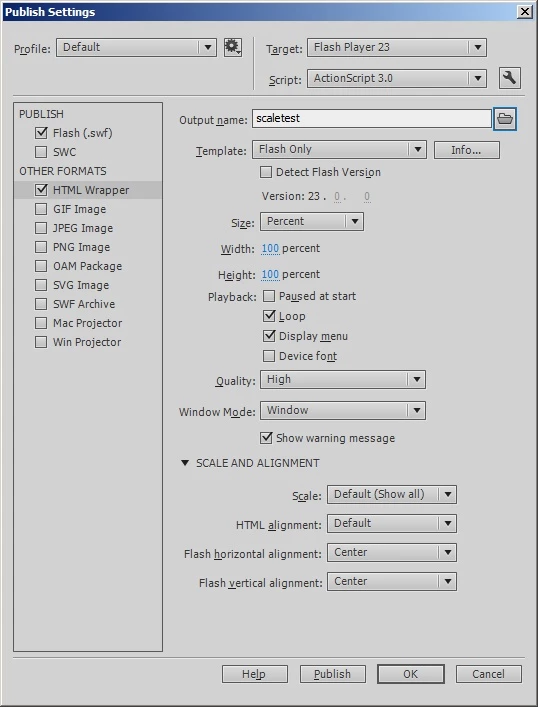
I just published a test SWF with these settings and it scaled full screen without me even having to modify the HTML at all.

2 replies

dinid47383756
Participant
March 22, 2017

<div id="container" style="width:100%;height:1000px;overflow:hidden;">

<object id="main" name="main" data="spacemap/main.swf" type="application/x-shockwave-flash" width="100%" height="100%">

  <param name="allowfullscreen" value="true">

  <param name="allowscriptaccess" value="always">

  <param name="quality" value="high">

  <param name="wmode" value="direct">

  <param name="bgcolor" value="#000000">

  <param name="scale" value="exactfit">

Still not working still max screen of it is 1280x900!

Legend
March 22, 2017

<div

    id="container"

    style="

        position: absolute;

        left: 0px;

        top: 0px;

        width: 100%;

        height: 100%;

        overflow: hidden;">

dinid47383756
Participant
March 22, 2017

still not working still looks like this http://prntscr.com/en9xx5

Legend
March 22, 2017

Just enable scaling in your SWF, then embed it in a DIV with the width and height properties set to "100%", and the Flash object widths and heights all set to "100%".

StageScaleMode - Adobe ActionScript® 3 (AS3 ) API Reference

dinid47383756
Participant
March 22, 2017

please can u tell me step by step how to enable that

Legend
March 22, 2017

I just did. It really is that simple.

In fact I think you don't even have to explicitly set the stage scale mode, since SHOW_ALL should be the default.