Participant
April 6, 2020
Answered

Symbol appears different inside than outside

  • April 6, 2020
  • 3 replies
  • 810 views

I'm just starting out in animate and decided to put together a simple animation of an Easter chick flapping its wings. It worked fine until I clicked out of the symbol onto the parent timeline and then all fills disapeared and it became a solid outline.

I have tried:

  • Breaking apart the symbol
  • Removing all the frames and re-adding them
  • Removing the fills within the symbol

I am completely stumped and everything I search for is swamped with other things to do with symbols, so I apologise if this is a replica post.

The video below shows the problem.

Can anyone help, thanks.

Thanks

    This topic has been closed for replies.
    Correct answer n. tilcheff

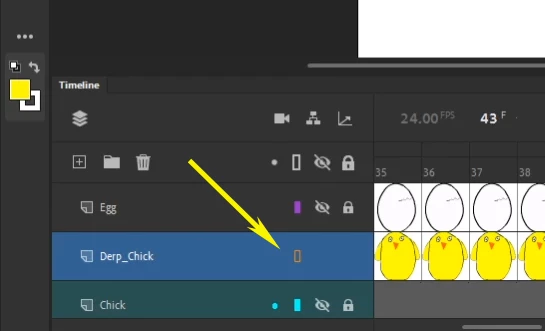
    As Chris suggested, your layer is in Outline mode, mate!


    Just click on the little orange rectangle to switch Outline mode off. 🙂 🙂 🙂 


    3 replies

    Participant
    April 7, 2020

    That worked, thanks

    n. tilcheff
    n. tilcheffCorrect answer
    Legend
    April 6, 2020

    As Chris suggested, your layer is in Outline mode, mate!


    Just click on the little orange rectangle to switch Outline mode off. 🙂 🙂 🙂 


    Nick - Character Designer and Animator, Flash user since 1998 | Member of the Flanimate Power Tools team - extensions for character animation
    _keyframer
    Community Expert
    Community Expert
    April 6, 2020

    Check to verify the layer the symbol is on is or is not set to Outline mode.

    Animator and content creator for Animate CC