Known Participant
June 20, 2020
Answered

Symbols changing frames constantly in animation

  • June 20, 2020
  • 1 reply
  • 581 views

This is happening to many of my symbols, but I'll stick to one for clarity. I have a rig. I created a head symbol for the rig. The head symbol has two rows in the timeline; one is for a happy face and the other is an emotionless face. I use the correct symbol. But when I play the animation back, the faces begin to switch between happy face and emotionless face every other frame. My goal is to have just one default frame being used unless I change it. This is happening to my hands and arms as well.


I spent two hours last night trying to figure it out. It's a recurring problem and I can't figure out what's causing it. I even went into the frame picker and picked the correct face for each frame...only to have many of them revert back again. Is Adobe playing a prank on me? Is there something that I can do or stop doing that will avoid this? Are there any good resources on learning more about nested symbols and frame selection that would help me understand the issue that I'm having?


Thank you in advance!! You will save my wall many holes and marks if you can help me.

This topic has been closed for replies.
Correct answer n. tilcheff

Hi mate,


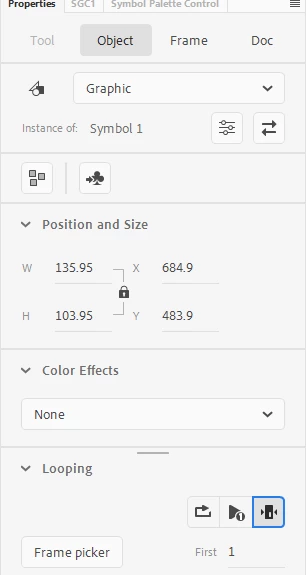
The symbol has to be Graphic and you need to just stop the Instance, i.e. choose Single Frame from the Looping properties:

Since you already have animation, you will need to stop it at every existing keyframe.


More information on setup for animation here:

http://flash-powertools.com/workflow/

http://flash-powertools.com/character-rigging-for-flash-animation/


1 reply

n. tilcheff
n. tilcheffCorrect answer
Legend
June 20, 2020

Hi mate,


The symbol has to be Graphic and you need to just stop the Instance, i.e. choose Single Frame from the Looping properties:

Since you already have animation, you will need to stop it at every existing keyframe.


More information on setup for animation here:

http://flash-powertools.com/workflow/

http://flash-powertools.com/character-rigging-for-flash-animation/


Nick - Character Designer and Animator, Flash user since 1998 | Member of the Flanimate Power Tools team - extensions for character animation
erics2020Author
Known Participant
June 21, 2020

Thanks again, Nick!!! I really appreciate your answers.

n. tilcheff
Legend
June 22, 2020

You're most welcome, Eric!

Well done!


Nick - Character Designer and Animator, Flash user since 1998 | Member of the Flanimate Power Tools team - extensions for character animation