Known Participant
Jan 9, 2023 10:46 AM UTC
Answered

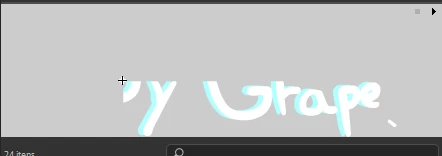
Symbols clipped in the Library.

So I had this problem for a few days and it's confusing my work with symbols. Do anyone know how to fix this? Is it a option? Or my program version? (22.0.3)

This topic is closed to new replies. Start a new post to keep the conversation going.
n. tilcheff
n. tilcheffCorrect answer
Legend
Jan 9, 2023 3:11 PM UTC

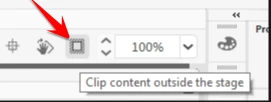
It's because of this poorly implemented function, which affects the Library previews:


Switch it off.


Nick - Character Designer and Animator, Flash user since 1998 | Member of the Flanimate Power Tools team - extensions for character animation

5 replies

n. tilcheff
n. tilcheffCorrect answer
Legend
Jan 9, 2023 3:11 PM UTC

It's because of this poorly implemented function, which affects the Library previews:


Switch it off.


Translate
Nick - Character Designer and Animator, Flash user since 1998 | Member of the Flanimate Power Tools team - extensions for character animation
Known Participant
Jan 9, 2023 3:33 PM UTC

Thank you! That worked, what a funny tool.

Translate
kglad
Community Expert
Community Expert
Jan 9, 2023 1:27 PM UTC

what are you showing?   part of the library panel or part of something else?


and, you don't have the most recent animate, so you could try updating.  it would probably be wise to replace your preferences, too.

Translate
Known Participant
Jan 9, 2023 3:33 PM UTC

It was the library panel, but we already fixed it :))

Translate
kglad
Community Expert
Community Expert
Jan 9, 2023 3:39 PM UTC

excellent (but the library panel doesn't work always properly so you may still see unexpected stuff there).

Translate