
Cabbagehead
Participating Frequently
September 23, 2021
Question

Symbols following a line

  • September 23, 2021
  • 2 replies
  • 422 views

Ok so I try to explain this to the best of my abilitys.

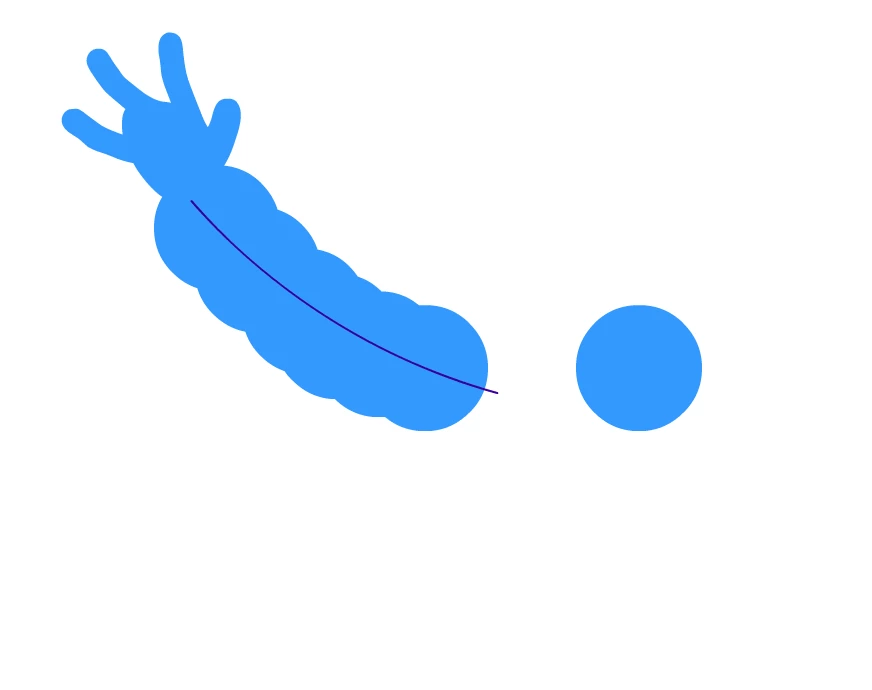
Basicly I have multible charakters whos arms are mode out of a bunch of balls.

I made a line that I could animate frame by frame ore maybe by form transformation.

But I need the balls to stay on the line when I move it.


Does anyone have a good hint that could nudge me in the right direction.

I am still a bit unsure how to tackle this myself, so any help would be appreciated.


-Cheers
    This topic has been closed for replies.

    2 replies

    _keyframer
    Community Expert
    Community Expert
    September 23, 2021

    So you want to bend the stroke and have the circles follow correct?

    I just tried setting up a stroke as a guide and each circle as a symbol on their own layers and linked to the guide layer. But moving the stroke didn't make the balls follow the stroke automatically.
    See my attached screencapture...

    Animator and content creator for Animate CC
    Cabbagehead
    Participating Frequently
    September 23, 2021

    That could be one way to do it.
    The thing is the arms I am working on have A LOT of balls (insert joke here). 
    I could do it like that but re aranging would probably take some time. But I will give it a shot.
    Thank you for extra making a video. 

    I can allways go back to just making the arms in illustrator and make the animation frame by frame and not using tweens.

    Again Thank you.

    _keyframer
    Community Expert
    Community Expert
    September 23, 2021

    You're welcome. You can always do what I did with keyframing - or use tweens, then convert to keyframes and adjust again. I often use tweens to get some motion quickly before going back in and converting tween spans to keys and fine-tuning.

    Animator and content creator for Animate CC
    n. tilcheff
    Legend
    September 23, 2021

    I'd suggest you look into custom brushes.


    Or a combination of a custom brush and a Smart Magnet Rig.


    Nick - Character Designer and Animator, Flash user since 1998 | Member of the Flanimate Power Tools team - extensions for character animation
    Cabbagehead
    Participating Frequently
    September 23, 2021

    I tried that but I don't think you can make the balls overlapp when making a pattern brush.
    It also seems to get rid of the the gradiant I added to it recently. I alos treid the bone tool, but I guess that would get to messy.

    Thank you for the suggestion tho.