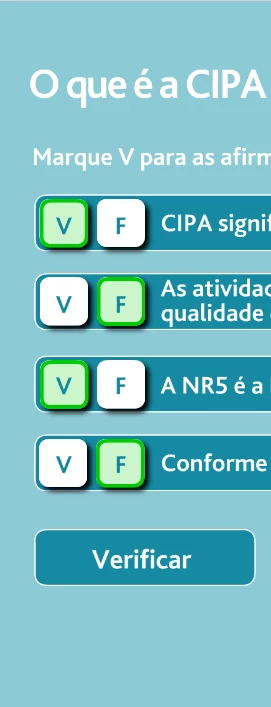
After the user clicks I would like to test the states with check
Hi.
Sorry for the delay. Really busy day.
I don't know if this is exactly what you want, but here is a suggestion:
AS3 code:
import flash.display.DisplayObject;
import flash.display.DisplayObjectContainer;
import flash.display.MovieClip;
import flash.display.SimpleButton;
import flash.events.MouseEvent;

function main():void
{
	questions.correctAnswers = [ "v", "f", "f", "v" ];
	questions.answers = []; // the answers and the correct answers will be stored on the actual Movie Clip instance containing the questions
	verifyButton.mouseEnabled = false;
	verifyButton.addEventListener(MouseEvent.CLICK, verify);
	questions.addEventListener(MouseEvent.CLICK, choose);
}

function choose(e:MouseEvent):void
{
	if (e.target is SimpleButton) // checking if the target that actually received the mouse event is one of the v or f buttons
	{
		// getting the current containers and index making use of the parent property
		var v:MovieClip = e.target.parent.parent.v;
		var f:MovieClip = e.target.parent.parent.f;
		var index:uint = e.currentTarget.getChildIndex(DisplayObject(e.target.parent.parent));

		if (e.target.parent === v)
		{
			v.gotoAndStop(2);
			f.gotoAndStop(1);
			e.currentTarget.answers[index] = "v";
		}
		else
		{
			v.gotoAndStop(1);
			f.gotoAndStop(2);
			e.currentTarget.answers[index] = "f";
		}

		verifyButton.mouseEnabled = e.currentTarget.answers.join("").length == e.currentTarget.correctAnswers.length;
	}
}

function verify(e:MouseEvent):void
{
	var i:uint;
	var total:uint = questions.answers.length;

	for (i = 0; i < total; i++)
	{
		var current:MovieClip = MovieClip(questions.getChildAt(i));

		current.results.gotoAndPlay(questions.correctAnswers[i] == questions.answers[i] ? "correct" : "wrong");
		questions.mouseChildren = false;
		verifyButton.mouseEnabled = false;
	}
}

main();
Code / files / source / FLA:
https://github.com/joao-cesar/adobe/tree/master/animate%20cc/as3/true_or_false_game
There are several ways of doing this. I hope it helps you to get started.
Regards,
JC




 AdChoices