vlceversa
Known Participant
May 25, 2013
Question

TextField autoSize and its Position within a Sprite

  • May 25, 2013
  • 1 reply
  • 1519 views

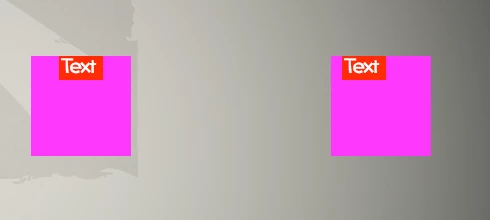
I am really confused, I have a Sprite Container, to this container I add 2 Sprites (first one at 0,0 and second one at 100,0), and after that I add 2 TextFields at the same position as the 2 Sprites. I set the TextFields autoSize property to TextFieldAutoSize.CENTER, assuming that they autosize depending on the Text. But the 2nd TextField's text isn't really centered. See screenshot. Maybe someone can enlighten me

This topic has been closed for replies.

1 reply

kglad
Community Expert
Community Expert
May 25, 2013

what code was used to draw the sprites?

vlceversa
vlceversaAuthor
Known Participant
May 25, 2013

Ummm, let me think

var sprite1:Sprite = new Sprite();

sprite1.graphics.beginFill(0xFF00FF);

sprite1.graphics.drawRect(x, y, 100, 100);

sprite1.graphics.endFill();


var sprite2:Sprite = new Sprite();

sprite2.graphics.beginFill(0xFF00FF);

sprite2.graphics.drawRect(x, y, 100, 100);

sprite2.graphics.endFill();


sprite2.x = 300;


addChild(sprite1);

addChild(sprite2);

and after that I add the TextFields and set the 2nd TextFields x property to 300

kglad
Community Expert
Community Expert
May 25, 2013

x and y are undefined in your code and would trigger a compiler error, if that were your code.

copy and paste (only) the relevant code.