
Answered
The Advanced Layer is Invisible
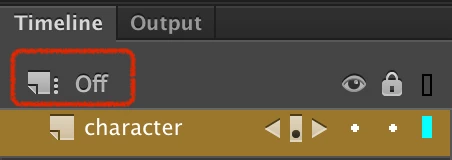
The advanced layer is none existent on my screen. This is what I'm looking for ^. But its not on my own screen. My layers are merged. How can I turn off advanced layers when this is not showing?

The advanced layer is none existent on my screen. This is what I'm looking for ^. But its not on my own screen. My layers are merged. How can I turn off advanced layers when this is not showing?
Thank you. I was able to turn off for the Animate 18 version, but this is on my schools computer. My laptop has the Animate 20 version and I don't see it there. Wanted to clarify. I will restart my computer and see if this helps.
Hi mate,
To turn off Advanced Layers in Animate 2019 and newer, go to your Modify > Document...
This dialog will open:
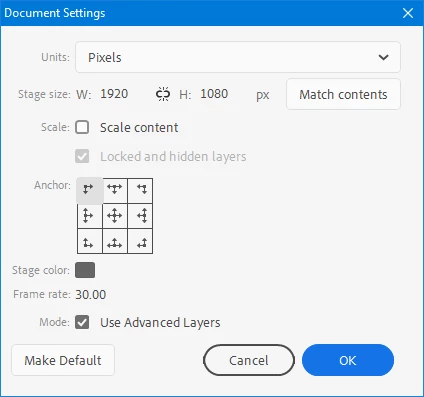
Uncheck the "Use Advanced Layers"
Press "Make Default" if you want new files to be created with Adv Layers off.
Hope this helps!
Already have an account? Login
Enter your E-mail address. We'll send you an e-mail with instructions to reset your password.


 AdChoices