
Participant
June 16, 2023
Answered

The bevel filter won't show up

  • June 16, 2023
  • 1 reply
  • 463 views

I've tried countless things, up-to-date tutorials and articles, trying different symbols, it felt like it wouldn't end. So please try to help me out here.
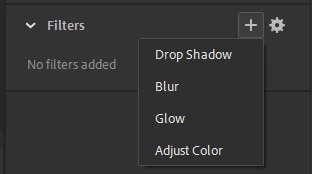
(Side Note: Those articles and tutorials said that the filters section is in the frame tab located in properties, but it's actually in the object tab. And it's only in the object tab when the component selected is a symbol).


This topic has been closed for replies.
Correct answer Mario_CR

Hi, switch to an Actionscript 3 document. Neither bevel nor frame filters are available in HTML5 Canvas.

1 reply

Mario_CR
Community Expert
Mario_CRCommunity ExpertCorrect answer
Community Expert
June 16, 2023

Hi, switch to an Actionscript 3 document. Neither bevel nor frame filters are available in HTML5 Canvas.

Participant
June 16, 2023

Quick question, should I use Actionscript 3 documents instead of HTML5 ones in general? Even if I'm not using filters?

Mario_CR
Community Expert
Community Expert
June 16, 2023

Use Actionscript 3 for non-interactive projects (video, gif, image sequences...)

HTML5 is more for interactive projects (apps, games, web, banner ads...)