Participant
January 23, 2024
Answered

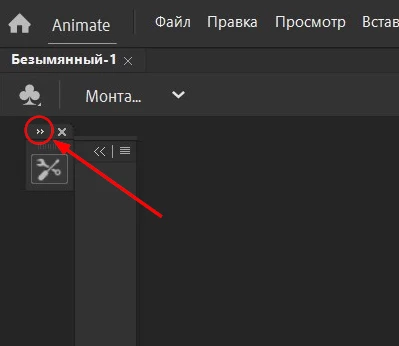
the toolbar has disappeared

  • January 23, 2024
  • 2 replies
  • 483 views

my toolbar disappeared a couple of days ago. I tried reinstalling the program and resetting the settings via Edit > Preferences >
Code Editor > Reset and select default values. but none of this helped.

    This topic has been closed for replies.
    Correct answer Mario_CR

    It's just collapsed, click the arrow to expand it. Or go to Window > Workspaces > Reset ("current workspace")


    2 replies

    kglad
    Community Expert
    Community Expert
    January 24, 2024

    p.s.  copy and paste screenshots into your adobe posts.  don't use the "insert photos"

    Mario_CR
    Community Expert
    Mario_CRCommunity ExpertCorrect answer
    Community Expert
    January 23, 2024

    It's just collapsed, click the arrow to expand it. Or go to Window > Workspaces > Reset ("current workspace")
