
Participating Frequently
January 12, 2022
Answered

There seems to be a problem with the font function supported by Creative Cloud.

  • January 12, 2022
  • 1 reply
  • 363 views

First of all, I'm using animate

Not long ago, I bought a new computer and moved the programs I used together.


But there were a few problems.

The first problem is that all existing fonts have disappeared.


When I first used animate on my previous computer, there were a lot of fonts that were basically provided.

However, after moving the computer, all the fonts that were used often disappeared for some reason.


However, this problem was solved by adding the fonts I needed using the functions provided by Creative Cloud.


But the real problem is here.

When I try to start working again by turning off and turning off the computer after adding the font I need, I definitely couldn't use the font I was using.


Obviously, I can see that the font I added is installed on Creative Cloud without any problems, but when I turn off and start the computer again, the font I added will not be available.

And this problem can be used by erasing the font I added and reinstalling it.


Whenever I turn on the computer for work, I have to erase the downloaded font back to the cloud and add it to use.


I don't understand that you have to experience this inconvenience every time.

I want you to tell me what caused this problem.


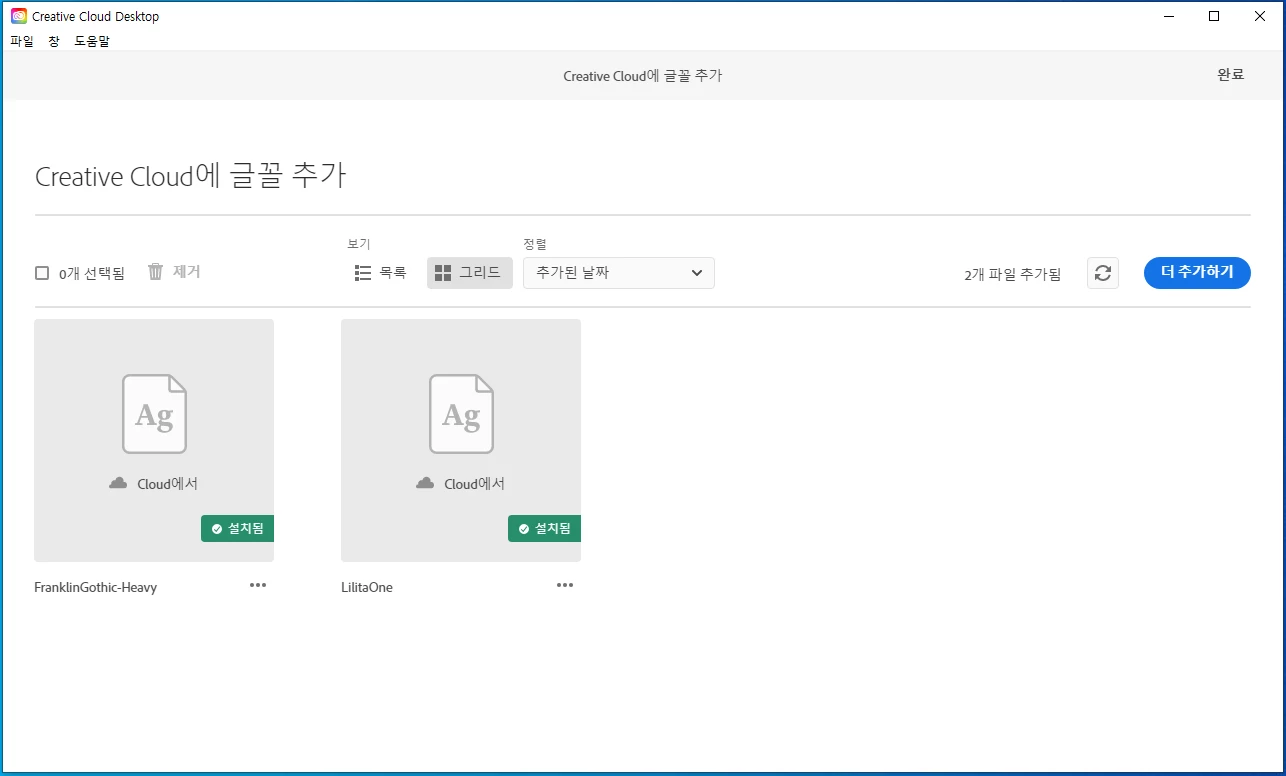
The picture below is that I saved the font I was using in the cloud.

Even if I turn on the computer again, it is always maintained in that state, but when I turn on the program, I get a message that I can't use the font.

Then I erase the font I added and add it again.


I always get a lot of help from this community. Thank you always. Guys.
 

    This topic has been closed for replies.
    Correct answer kglad

    I installed creative cloud on the official site and downloaded the program I needed.


    I installed it in the same way before.


    i assume (but i'm still not sure) you're saying yes, you used the cc desktop app to install animate.


    if that's true,


    first, reset the cc app:

    to reset the cc desktop app, make sure it's in the foreground, then press:

    Win: Ctrl + Alt + R
    Mac: Cmd + Opt + R

    if that fails, try to repair
    https://helpx.adobe.com/download-install/kb/creative-cloud-install-stuck.html

    if that fails go ahead and uninstall using the correct uninstaller from https://helpx.adobe.com/creative-cloud/help/uninstall-creative-cloud-desktop-app.html#sa_src=web-messaging and then reinstall

    if that fails, do a clean cc install following each applicable step:

    uninstall every cc app including preferences, https://helpx.adobe.com/creative-cloud/help/uninstall-remove-app.html
    then uninstall the cc desktop app, again using the correct uninstaller, https://helpx.adobe.com/creative-cloud/help/uninstall-creative-cloud-desktop-app.html#sa_src=web-messaging
    clean your computer of cc files per http://www.adobe.com/support/contact/cscleanertool.html
    check for, and if available, update your os
    repair all ms visual c++ versions that can be repaired.
    update your ms visual c++, if it can be updated
    restart your computer (don't skip this)
    reinstall the cc desktop app, https://creativecloud.adobe.com/apps/all/desktop?action=install&source=apps&productId=creative-cloud
    if you're unable to download the cc desktop app at this stage, use the link at the bottom of the page at https://helpx.adobe.com/download-install/kb/creative-cloud-desktop-app-download.html
    use the desktop app to install your cc programs/trials

    1 reply

    kglad
    Community Expert
    Community Expert
    January 14, 2022

    what do you mean by "..and moved the programs I used together"?


    unless you properly installed them de novo using the cc desktop app you can expect issues.

    Participating Frequently
    January 17, 2022

    This means that I started living in a new place, and at the same time, I bought a new computer.


    And it means that I reinstalled the two programs I use, Animate and Premiere, on my new computer.


    Sorry for the late response to the question.


    I wonder what it is that I didn't install it properly.


    If what cc desktop means is creative cloud, I don't think there's a problem with it being installed incorrectly.


    What I'm taking issue with is that in order to use the font I need, I have to reinstall it every time I turn on the computer.


    If it is difficult to help you with my question, I will ask the community again about this content.


    I look forward to your kind cooperation.

    Participating Frequently
    January 17, 2022

    Sorry, there was an error in the translation. Please change this sentence to this.


    "If what cc desktop means is creative cloud, I don't think there's a problem with it being installed incorrectly."

    ->

    "If CC desktop means creative cloud, I think I installed it properly."
