
January 17, 2020
Answered

Timeline - Keyframe's displayed as Thumbnails?

  • January 17, 2020
  • 1 reply
  • 1196 views

One of my students updated Animate and when he came online for the session he had Thumbnails (similar to any editing software) on the timeline instead of the age old · 

I asked him how he did it, and he did not know, said it was an accident that he liked, but couldn't remember what he did "wrong."

I can't seem to find that option in the menus, or the icons anywhere around the timeline.
 

This topic has been closed for replies.
Correct answer GoryGreg

Hi,

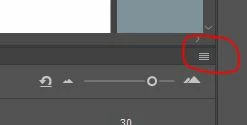
I think he has selected either 'Preview' or 'Preview in Context' when you click on the burger icon highlighted below and it opens up the menu with options I just mentioned...

Hope this is what you are looking for? I never use it so can't be sure.

Cheers

Greg

1 reply

GoryGregCorrect answer
Inspiring
January 17, 2020

Hi,

I think he has selected either 'Preview' or 'Preview in Context' when you click on the burger icon highlighted below and it opens up the menu with options I just mentioned...

Hope this is what you are looking for? I never use it so can't be sure.

Cheers

Greg

January 19, 2020

That's it! Thanks!

WhiteArrowhead
Inspiring
January 30, 2023

Was looking for this option also. Leave it to Adobe to hide anything useful . That burger menu contains even the newly hidden ability to save your workspace . Its existence was a terrible idea .