Participant
June 6, 2020
Answered

Tools arent coming through with stroke color of fill color

  • June 6, 2020
  • 1 reply
  • 525 views

I'm new to animate and I dont really know how to properly describe the problem I am having. It doesn't matter what brush i'm using or shape i'm making it isn't showing me the stroke color or fill color, It's just outlining the "path" with the color of the layer that the "path" is on. I updated and it was still happening. Then I unstalled/reinstalled and it was still happening. I also messed around with preferences and no luck. 

This topic has been closed for replies.
Correct answer n. tilcheff

Hi mate,


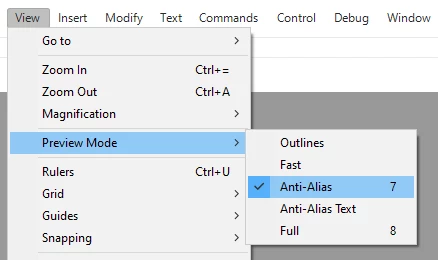
Go to the View menu and check the Preview Mode. It has to be anything but Outlines.

I usually switch between Anti-Alias and Full.


1 reply

n. tilcheff
n. tilcheffCorrect answer
Legend
June 6, 2020

Hi mate,


Go to the View menu and check the Preview Mode. It has to be anything but Outlines.

I usually switch between Anti-Alias and Full.


Nick - Character Designer and Animator, Flash user since 1998 | Member of the Flanimate Power Tools team - extensions for character animation
Grim SAuthor
Participant
June 7, 2020

Thanks so much! 

Cheers!