
Participating Frequently
December 7, 2022
Answered

Tools Not Showing

  • December 7, 2022
  • 1 reply
  • 873 views

I am having an issue with tools not showing up in Animate. On one computer all of the tools show up in the timeline
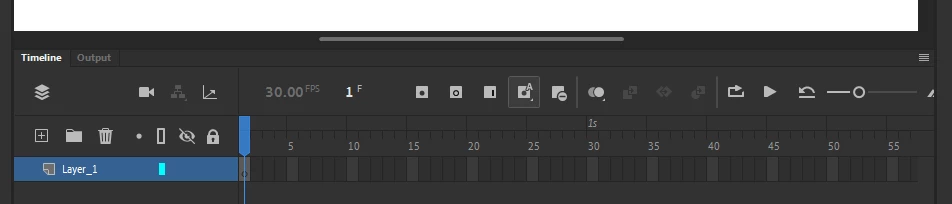
However, on another computer all of the tools for inserting frames and keyframes do not appear. Even, my ability to select frames by highlighting and adding is different from one computer to the next.

I am assuming it is an option somewhere that I have not selected, but find it odd that the defaults would be different. The software is up to date on both computers so I am stumped.

    This topic has been closed for replies.
    Correct answer Myra Ferguson

    It appears that the first screenshot has the Preferences set to Beginner Preferences, whereas the second screenshot has them set to Expert Preferences. You can change them by going to Preferences (via the Edit menu on Windows or the Animate menu on macOS).

    1 reply

    Myra Ferguson
    Community Expert
    Myra FergusonCommunity ExpertCorrect answer
    Community Expert
    December 7, 2022

    It appears that the first screenshot has the Preferences set to Beginner Preferences, whereas the second screenshot has them set to Expert Preferences. You can change them by going to Preferences (via the Edit menu on Windows or the Animate menu on macOS).

    Participating Frequently
    December 7, 2022

    Thank you so much, that solved the problem. It is weird that it is different on the two, I must of clicked on something at some point, but this fixes it.