
Participant
May 22, 2021
Answered

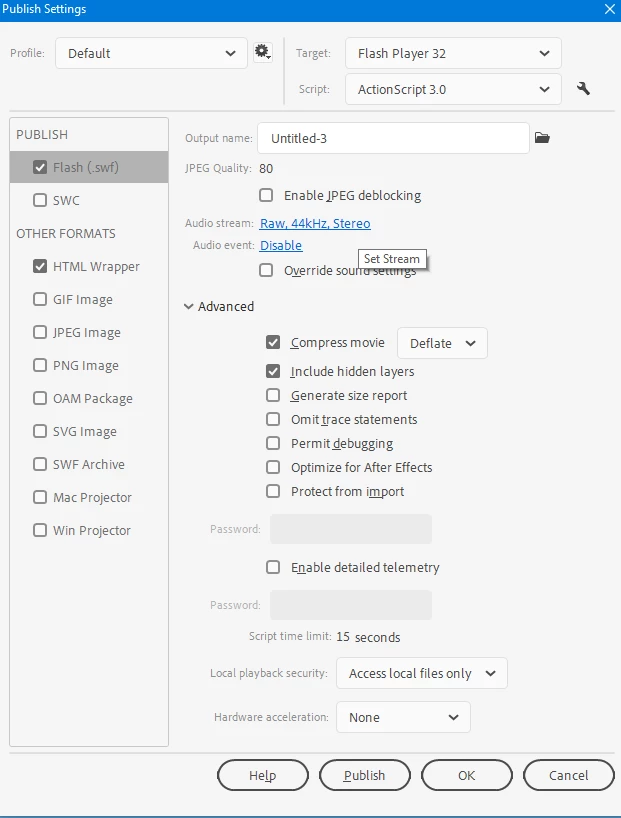
Trying to find a way to change my audio quality from MP3 to RAW. Where can I find it?

  • May 22, 2021
  • 2 replies
  • 293 views

This is the 21.0.6 variant and I'm trying to look everywhere in Animate to try and export it with an audio that doesn't sound choppy like the last few posts I've seen before. Now that I check publish settings, I don't see the sound settings anymore. Where can I find it now in this version instead? Do I need to download premiere pro now because of it? I'm only using one audio layer (via music.) That's all that I have: one layer of music.

    This topic has been closed for replies.
    Correct answer n. tilcheff

    Make sure your document type is AS3.

    Then RAW will be in the usual place.


    2 replies

    n. tilcheff
    n. tilcheffCorrect answer
    Legend
    May 22, 2021

    Make sure your document type is AS3.

    Then RAW will be in the usual place.


    Nick - Character Designer and Animator, Flash user since 1998 | Member of the Flanimate Power Tools team - extensions for character animation
    Participant
    May 22, 2021

    Wow, just that simple huh.

    I really am new as you can tell.

    Thanks!

    Participant
    May 22, 2021

    I should also note this, but I can't even change the profile, I don't see anything that has ActionScript 3.0. I don't see anything that were revolved around the forums yet. I don't see any flash file, alternative choices, etc.