Participant
October 26, 2010
Answered

tween + createEmptyMovieClip

  • October 26, 2010
  • 1 reply
  • 567 views

hello,(sorry for my english)
i am trying to create a square with "createEmptyMovieClip" and after use a tween on it

exemple:


import mx.transitions.Tween;
import mx.transitions.easing.*;

var zone : MovieClip =this.createEmptyMovieClip('zone',1);

zone.beginFill(0x000000,100);
zone.moveTo(100,100);
zone.lineTo(100,105);
zone.lineTo(200,105);
zone.lineTo(200,100);
zone.lineTo(100,100);
zone.endFill;

var TweenJauge:Tween = new Tween(zone, "_height", Regular.easeOut, 5, 10, 8, true);

my square is good but

i want it to stay at 100,100 and his height get up from 5 to 10

instead of this, he moves down on my scene and get his height up

i don't understand why he moves on my scene and i want to know how to make him grow up by the top and not the bottom
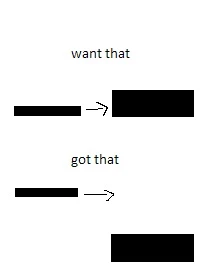
thank's for your help

This topic has been closed for replies.
Correct answer srirama_83

If you Just want the Size to increase you can use this

import mx.transitions.Tween;

import mx.transitions.easing.*;

var zone:MovieClip = this.createEmptyMovieClip('zone', 1);

zone._x=20

zone._y=30

zone.beginFill(0x000000,100);

zone.moveTo(0,0);

zone.lineTo(0,20);

zone.lineTo(200,20);

zone.lineTo(200,0);

zone.lineTo(0,0);

zone.endFill;

var TweenJauge:Tween = new Tween(zone, "_height", Regular.easeOut, zone._height, (zone._height+30), .6, true);

and If you want the box to move up with increase in size , add this to the end of code above..

var TweenJaugeY:Tween = new Tween(zone, "_y", Regular.easeOut, zone._y, (zone._y-30), .6, true);

Let me know if this works for you.

1 reply

srirama_83Correct answer
Inspiring
October 26, 2010

If you Just want the Size to increase you can use this

import mx.transitions.Tween;

import mx.transitions.easing.*;

var zone:MovieClip = this.createEmptyMovieClip('zone', 1);

zone._x=20

zone._y=30

zone.beginFill(0x000000,100);

zone.moveTo(0,0);

zone.lineTo(0,20);

zone.lineTo(200,20);

zone.lineTo(200,0);

zone.lineTo(0,0);

zone.endFill;

var TweenJauge:Tween = new Tween(zone, "_height", Regular.easeOut, zone._height, (zone._height+30), .6, true);

and If you want the box to move up with increase in size , add this to the end of code above..

var TweenJaugeY:Tween = new Tween(zone, "_y", Regular.easeOut, zone._y, (zone._y-30), .6, true);

Let me know if this works for you.

Participant
October 26, 2010

thank you, it works

but he was just because i didn't start my square at (0,0)

if i start at (0,0) it works good

but if i do start at (50,50), tween works not in the right way

so now i know i got to start all my square a (0,0) and move them after with mySquare._x etc...

thank's again

Inspiring
October 26, 2010