
Participating Frequently
November 29, 2023
Answered

Tweening with alpha color effect breaks export

  • November 29, 2023
  • 3 replies
  • 1962 views

So I'm working on an animation and I finished the project, and all that's left to do is add some pictures of text that fade in over the top of the animation. To do this, I created a classic tween, the first frame using the Alpha color effect to be entirely transparent, and the next frame being completely opaque so it fades in like I wanted it to. This effect looks fine before I export it. However, when I export it, I get a series of errors and my export is all messed up. The exported video's camera tool doesn't work anymore, along with the text not fading in, and simply appearing. How do I fix this?


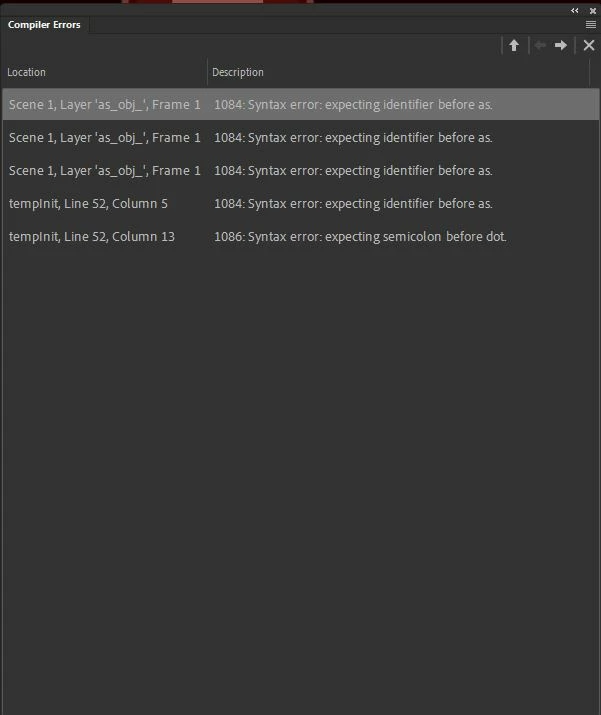
These are the error messages I get when exporting
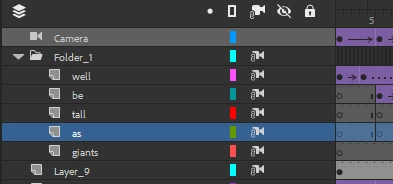
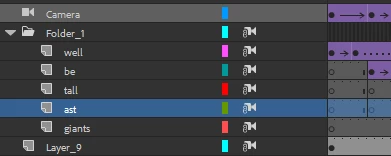
I've also attatched what my export looks like when I don't add the words, and what it looks like when I do add the words.
This topic has been closed for replies.
Correct answer Mario_CR

https://drive.google.com/file/d/1V5YLDtkayNRu-E-XLa5FvcfThXp9za3_/view?usp=sharing

Here's the link!


Thank you, I looked at your file, and unbelievably, the issue is the NAME of one of your layers.

The layer in question is layer "as", inside Folder 1. 

Turns out you can't have a layer named "as" with a camera on stage.

Made a test on a new document, previewed the SWF and got the same syntax error.


I changed the name and added a "t" which seems to fix it, but you can change it to whatever you want. Give it a try and let me know if it works for you.


On a side note, there are serious workflow issues with your project like: auto-generated symbols (tween1, tween2, tween3 etc), randomly switching from movie clips to graphics from one frame to another and so on. Although these have nothing to do with the camera problem, learning how to properly use symbols will help you to avoid similar frustrations in the future: https://youtu.be/NO2tcqbOx_U?si=jN619Y41TYF960XN

3 replies

Mario_CR
Community Expert
Community Expert
November 29, 2023

You could also try removing the frame effect and apply it on the symbol instead. The issue could also be caused by an Actionscript V-Cam, there are a few of those floating around the web, are you using one of these in your project?

What version do you have installed? Is it Animate 24.0 or something else?

Participating Frequently
December 1, 2023

I tried applying the frame effect to the graphic symbol, no luck. I'm not sure what an Actionscript V-Cam is, so I don't think I've downloaded/am using one. I was running 23.0 so I updated it and tried again, still no luck. I kind of solved it with another suggestion in this thread telling me to export it as an image sequence, but it would be way more convenient if I'm able to get this with the audio intact and not having to figure out how to splice all of the images together. Thanks for the suggestions

kglad
Community Expert
Community Expert
December 1, 2023

are you still seeing those syntax errors when you publish/test?

sergiopop75
Inspiring
November 29, 2023

To export layers with alpha effects and other methods, the solution is to export image sequences, png or jpg, using menu/export movie. From this option, the export is based on what is displayed. When you export as a video, it first makes a SWF and then converts to video, so the effects are not applied.

____2D vector animator since 2000 & PhD
Participating Frequently
December 1, 2023

This worked! I'm still going to try and figure out the solution for how I can export this as an mp4, as it's much more convenient for me and would be nice in the future, haha. Thank you 🙂

kglad
Community Expert
Community Expert
November 29, 2023

check your actions panel for inadvertent code/random characters you may have entered.

Participating Frequently
December 1, 2023

How do I check my actions panel?