Known Participant
January 28, 2019
Answered

Un-select texture option?

  • January 28, 2019
  • 1 reply
  • 220 views

All,

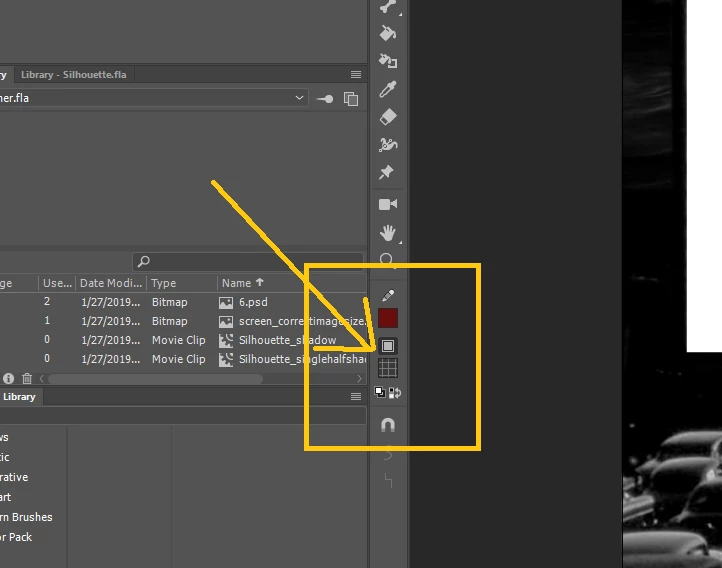
I've somehow selected a texture with my fill and I cannot for the life of me get it unselected. Changing to a different color, gradient, etc. does nothing but change the color around the texture. Full factory reset changes nothing.  See photo. Any thoughts?
This topic has been closed for replies.
Correct answer JoãoCésar17023019

Hi.

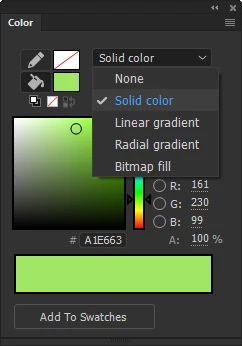
If I'm understanding correctly the issue you're facing, you should be able to revert the fill type to solid using the Color Panel (Ctrl/Cmd + Shift + F9).

Please let us know if this works.

Regards,

JC

1 reply

JoãoCésar17023019
Community Expert
JoãoCésar17023019Community ExpertCorrect answer
Community Expert
January 28, 2019

Hi.

If I'm understanding correctly the issue you're facing, you should be able to revert the fill type to solid using the Color Panel (Ctrl/Cmd + Shift + F9).

Please let us know if this works.

Regards,

JC