
HeydanAnimations
Participant
December 5, 2020
Answered

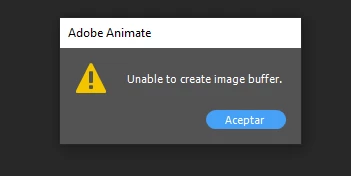
Unable to create image buffer
  • December 5, 2020
  • 3 replies
  • 3948 views

What can I do when this happens? By the way, it happens when I put the pen pressure. I hope that experts can respond to me.

This topic has been closed for replies.
Correct answer n. tilcheff

I'd start by

updating Windows,

then the graphics driver,

then the tablet driver,

and finally installing the latest version of Animate separately to see if it happens there too.


Any of these might resolve the issue or not, so I'd restart the computer and check at every step. 

While Windows and nVidia drivers are generally quite well-tested and solid, tablet drivers for devices other than Wacom seem to suffer from all kinds of issues and so does Animate.


3 replies

Participant
October 23, 2022

This has happened to me many times, but I still haven't been able to find a way to fix it. But when this happens my screen usually goes black and if I don't touch anything I can save my work but when I press anything on the keyboard or draw my screen goes black and this error appears and no matter what I do, I can't close it. There is still a way to save your project after this happens. Press Ctrl + S quickly and several times and press enter to save your project after several attempts

kglad
Community Expert
Community Expert
October 23, 2022

learn to save your fla files frequently with increasing version number appended.  ie, for project1, save project1_v000.fla, project1_v001.fla etc.


periodically close and reopen the most recent version to confirm it's not corrupted.  if it's not, you can delete previous versions.

Participant
August 18, 2021

That happens to me but it won't let me save the project, what can I do there?

Participant
September 23, 2021

While it is a pain, I restart my dell labtop and it will pop up the unclosed animate tab. If you click cancel on the restart, it will put you back at animate where you can save. Although, the image buffer will reappear so you need to restart your computer.

Participant
December 19, 2021

Man you're an absolute legend!!

i lost many files because i couldnt get past that annoying message.
cant thank you enough!!!!!

n. tilcheff
n. tilcheffCorrect answer
Legend
December 5, 2020

I'd start by

updating Windows,

then the graphics driver,

then the tablet driver,

and finally installing the latest version of Animate separately to see if it happens there too.


Any of these might resolve the issue or not, so I'd restart the computer and check at every step. 

While Windows and nVidia drivers are generally quite well-tested and solid, tablet drivers for devices other than Wacom seem to suffer from all kinds of issues and so does Animate.


Nick - Character Designer and Animator, Flash user since 1998 | Member of the Flanimate Power Tools team - extensions for character animation
HeydanAnimations
Participant
December 6, 2020

Thanks! Your answer help me a lot!