

Dawn_Likes_Pancakes
Participant
June 23, 2021
Answered

Unable to export video, but can export movie

  • June 23, 2021
  • 1 reply
  • 1047 views

I've been using Adobe Animate 21.0.1 for a while.
When I try to export video it always gives me this error, no matter the file type/presets I choose.
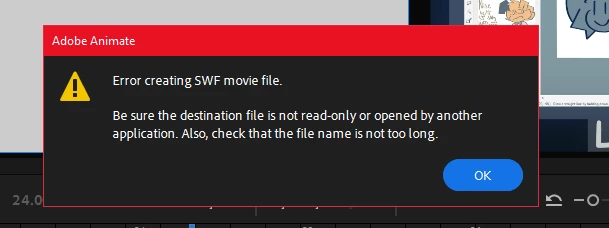
But if I export a SWF movie or image sequence, its works fine.
This happens to all my files with audio. When I delete the audio it still won't export.

I've already uninstalled and reinstalled all my cc apps and used the CreativeCloudCleaner.
I don't have the option to update since my computer lags quite a lot.

This topic has been closed for replies.
Correct answer Sukhesh Shenoy

Please try these mentioned below -

1. Create a folder in Desktop (name it test), copy-paste the FLA here and try exporting video again. (To check if there is any issue with fla's current directory)

2. Create a new file in Animate -> create/draw something random -> save the file in the same directory (test) -> Export video. (To check if the issue is file specific or generic)

Let me know how it goes.

1 reply

Adobe Employee
June 23, 2021

Hi @Dawn_Likes_Pancakes ,

It must be due to an incorrect output path in the "Publish Settings" of the file.

With the same file, is Test Movie (ctrl+enter) working fine? If it does not work, you may encounter a warning - here, resetting the publish directory to default should solve the problem you are facing.

Kindly try this out - let me know if you continue to face issues.


Thanks, Sukhesh.

Dawn_Likes_Pancakes
Participant
June 24, 2021

ctrl+enter works fine
how do i reset the publish directory? im still new to the program

Sukhesh ShenoyCorrect answer
Adobe Employee
June 24, 2021

Please try these mentioned below -

1. Create a folder in Desktop (name it test), copy-paste the FLA here and try exporting video again. (To check if there is any issue with fla's current directory)

2. Create a new file in Animate -> create/draw something random -> save the file in the same directory (test) -> Export video. (To check if the issue is file specific or generic)

Let me know how it goes.