

Firewood:D
Inspiring
August 8, 2023
Question

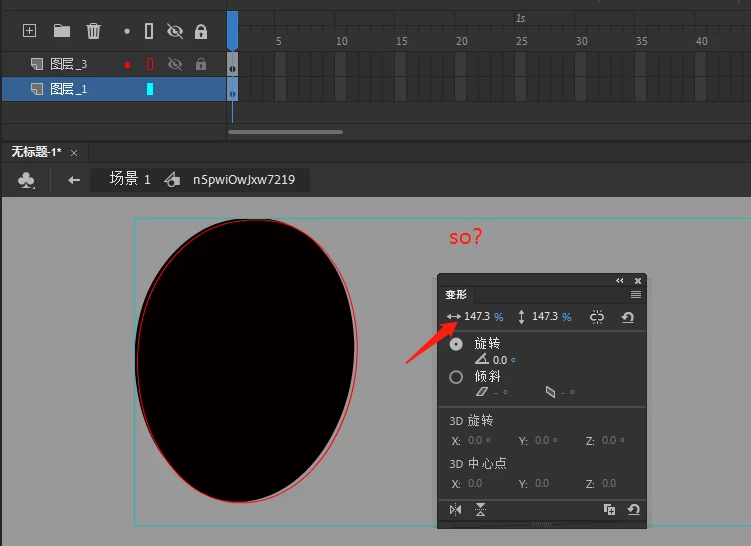
Unable to paste in place, object position offset
  • August 8, 2023
  • 1 reply
  • 588 views

 Using paste to the current location, the shortcut ctrl+shift+v, the object position has undergone a terrible offset

I checked the documents and found that this was a really catastrophic problem.

No matter how careful you are, you will inevitably encounter these problems. In production, or using illustrator material, the scaling and deformation of elements is inevitable, and these subtle deviations cannot escape my eyes.

So, I have to do a lot of manual alignment every time? Or restore the deformation and remake it? Is there a good way to avoid it? 

    This topic has been closed for replies.

    1 reply

    kglad
    Community Expert
    Community Expert
    August 8, 2023

    it's not clear (to me) what you're trying to show, nor what exact steps are needed to duplicate the problem you're seeing.

    Firewood:D
    Inspiring
    August 9, 2023

    This is a difficult thing to deal with. It happens occasionally, but once it happens, it is annoying. The problem usually occurs when making character animations. I think friends who have the same workflow as me will definitely encounter this problem. ,
    A simple copy, pasted in place, a slight offset occurred,
    The post is hanging, record this embarrassing thing, waiting for people who encounter the same problem

    kglad
    Community Expert
    Community Expert
    August 9, 2023

    how many copy and pastes does it usually require?