
Participant
January 16, 2014
Answered

Unable to Switch Audio Sync Settings

  • January 16, 2014
  • 5 replies
  • 29830 views

Hey everyone,

I'm trying to create an animation based off of a 5-minute mp3 audio recording. I need to be able to switch my audio sync settings to Stream so that I can preview audio anywhere in my animation. Currently if I press play just anywhere in the animation it doesn't play the audio. I have to play from the beginning to hear.

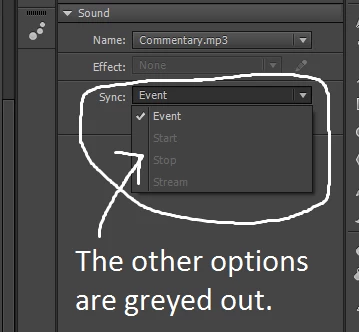
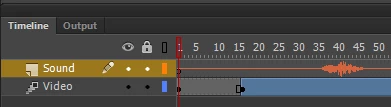
After doing some searching on the Internet, I figured out I have to switch my audio sync setting to Stream so that I can play audio anywhere in the timeline. However, the only option I have available is Event. The other ones are greyed out, as the screenshots below testify. Any help would be appreciated. Thanks!
Hardware and Software Statistics:

Adobe Flash Professional CC (CS6) - Version 13.1.0.226

Windows 7 Home Premium - Version 6.1 - Build 7601: Service Pack 1

Intel Core i7, 4GB RAM, NVIDIA GeForce GT 525M

This topic has been closed for replies.
Correct answer kristofer

Hi jato9281,

Is your project an HTML5 project?  For some reason HTML5 projects only support "Event" audio.  If you use an Action Script 3 project  you should be able to switch your audio to Stream.

5 replies

mlevered
Participant
June 29, 2016

Does anyone know when Adobe is planning to add audio streaming support to html5 documents created in Animate? As we inch closer to a full scale transition from Flash to html5, I'm hoping that all these unsupported features ( See how Animate CC handles unsupported content types when you migrate content to HTML 5 Canvas ) continue to become integrated into html5 Canvas.

Colin Holgate
Inspiring
June 29, 2016

It may be that some things will be too hard to do in Javascript compared to AS3 playing in a native code plugin. In the case of Stream sync though you can code your own solution for playback. Look at this code as an example way of making a 500 frame animation keep up with real time Event audio:

var fps = 24;

var starttime = createjs.Ticker.getTime();

createjs.Ticker.setFPS(fps);

createjs.Ticker.addEventListener("tick", movealong);

self = this;

var firstframe = 0;

var lastframe = 500;

function movealong() {

  var now = createjs.Ticker.getTime();

  var f = Math.min(lastframe,Math.floor((now - starttime) / 1000 * fps + firstframe));

  self.gotoAndStop(f);

}

mlevered
Participant
June 29, 2016

Thanks Colin, that's very helpful. I don't code, but I work with devs who could help me. Part of the beauty of Flash is that it is such a powerful tool for animators who don't code. Features like the stream setting are pretty critical for lip sync and other animation elements that coordinate with audio. It would be shame if that were lost for good, and only available to those savvy enough to use a workaround. In general, I hope Adobe can cut down that list of unsupported features, otherwise a lot of people's existing content will become basically unusable when they transition to html5 canvas output.

amy_macdonald
Participating Frequently
November 23, 2015

We had the same problem with files that WERE AS3 files with imported wav files. When I copied all frames/layers and pasted them into a new AS3 document we could then switch from EVENT to STREAM.

Mohanaraj
Adobe Employee
Adobe Employee
November 24, 2015

Hi,

Is it possible for you to share the AS3 fla where the Sync type is disabled for us to investigate?

You can us any file sharing utility like Drop Box to share the fla.

Thanks!
Mohan

amy_macdonald
Participating Frequently
November 28, 2015

Hi- it was a student's file but I've run into this problem as well. If it happens again I'll send it. Belated thanks for responding.

Best,

Amy MacDonald

Participant
February 20, 2014

Anybody ever figure this out?  I've been using Flash for years and always use stream.  I can't for the life of me figure out why I can't select Stream in the Sync settings.

Note:  I'm using Flash CC.

Mohanaraj
Adobe Employee
Adobe Employee
February 20, 2014

Hi,

As Kristofer pointed out, if you are in HTML5 Canvas document then these sound options (Effect type and Sync type) are disabled. The target platform(HTML5 Canvas) doesnt support these functionalies and hence they are disabled.

You will get the following message if you try to paste a layer with such sound properties

* Effect type of Sound cannot be imported in HTML5 Canvas document.

* Sync type is not supported in HTML5 Canvas document, and has been converted to Event.

If you create a ActionScript 3.0 document then these options are available for you to manipulate where the target platform(Flash) has a support the same.

Thanks!
Mohan

Participant
February 20, 2014

Fantastic, thanks!  I had a brain hiccup and just didn't see Krisofer's helpful posting!

kristofer
kristoferCorrect answer
Participant
January 17, 2014

Hi jato9281,

Is your project an HTML5 project?  For some reason HTML5 projects only support "Event" audio.  If you use an Action Script 3 project  you should be able to switch your audio to Stream.

Participating Frequently
October 23, 2014

Thank you so much Kristofer. I seriously spent the last 20 minutes trying different audio formats and the whole nine, then finally came up with the right google search word combination to find the solution. I knew it was going to be some kind of simple fork in the road issue. Action Script 3 doc, and I'm off and running. Much appreciated.

kglad
Community Expert
Community Expert
January 16, 2014

restart your computer and retry.

if that fails upload your mp3 somewhere and post a link.

jato9281Author
Participant
January 16, 2014

The first the thing a person should always do when they encounter a problem is restart their computer. No worries, I did that.

I tried converting the file to OGG and WAV to see if it would work better. Apparently Flash Professional handles WAV fine, allowing me to switch between Stream and Event audio sync settings. That's kind of strange, because WAV files are so huge and aren't practical when developing a game or something like that.

Thankfully, I'm just using Flash Professional to export a video, so I don't care about file size, but it's a disturbing bug.

If anyone knows why I was unable to switch to Stream audio sync settings with MP3 files, please speak up.