
Known Participant
June 22, 2017
Answered

Unused Assets in Library?

  • June 22, 2017
  • 1 reply
  • 2618 views

Is there a way to automatically find out what assets in your library are unused? When I began this project, I was doing Tweens backward, so making 3-4 instances of symbols and a lot of them are unused. I can go through one by one and see which ones break my animation if I delete them, but its a 2 minute animation and with 60 assets, at least half unused, that could take 6 hours.

It'd be nice if there was a way for Animate to say, "Hey, you have unused assets that are driving up your project size and here they are: ... Use or delete them to save space..."
    This topic has been closed for replies.
    Correct answer Joseph Labrecque

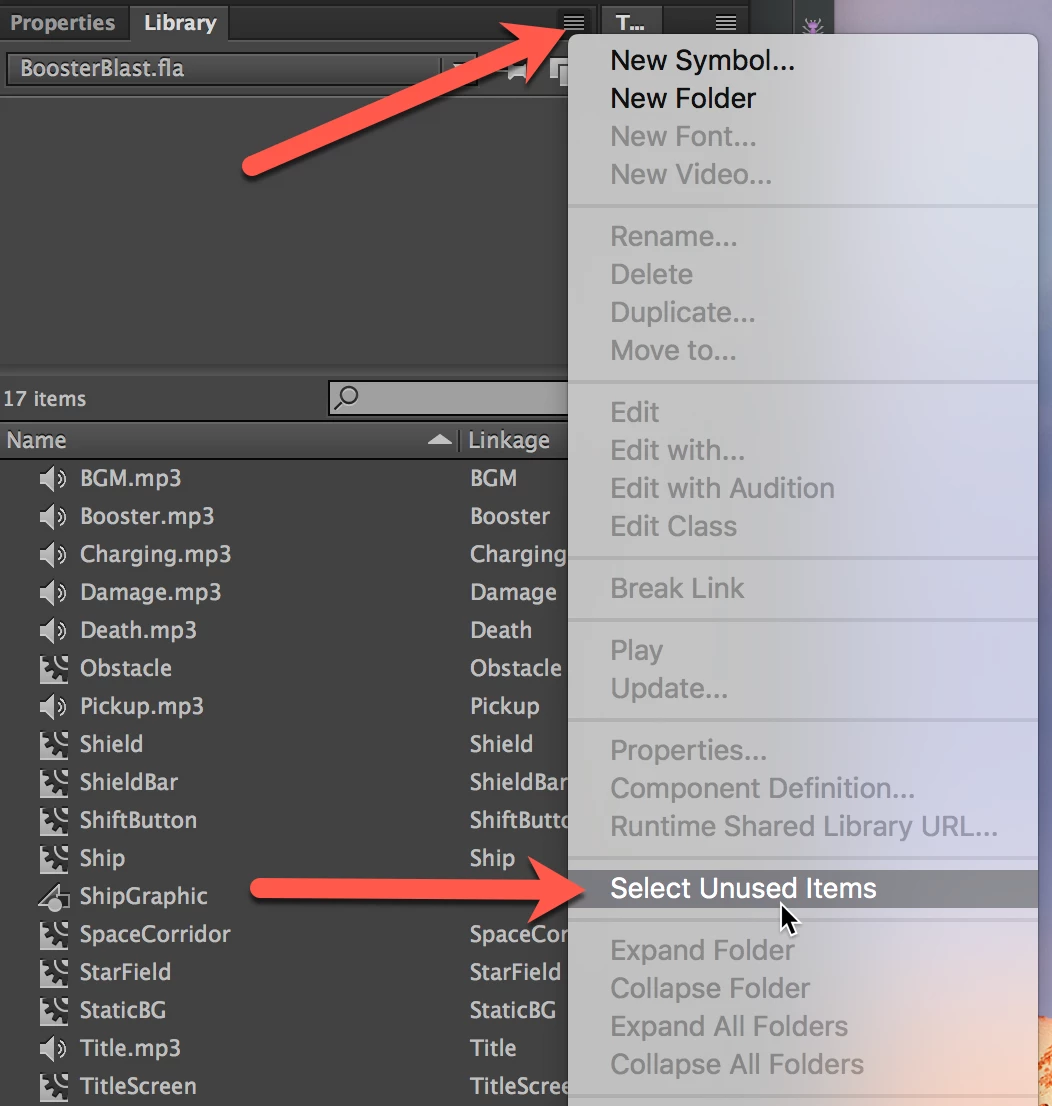
    Absolutely. In the Library panel - choose to open the options menu and select "Select Unused Items".

    1 reply

    Joseph Labrecque
    Community Expert
    Joseph LabrecqueCommunity ExpertCorrect answer
    Community Expert
    June 22, 2017

    Absolutely. In the Library panel - choose to open the options menu and select "Select Unused Items".

    JJW83Author
    Known Participant
    June 22, 2017

    Thanks Joseph ...

    By the way, loving your videos on Lynda.com and watching your videos now on AdobePress.

    You're amazing.

    Joseph Labrecque
    Community Expert
    Community Expert
    June 22, 2017

    You are welcome - and thank you!